Case study: a cloud kitchen runs five brands from one line
Thursday at 19:00, Bayt Al Sahab has five storefronts open and one production line behind them. Customers see separate brands. The kitchen sees one difficult service unless every ticket has a clear destination.
Nexara is a restaurant order and operations platform built in Amman, Jordan. It gives a multi-brand cloud kitchen one order board, separate menus, Talabat and Careem intake, and Arabic kitchen printing. Aggregator activation depends on partner approval. Start by testing one brand, menu and printer route.
Figures in this post are illustrative examples, not a client's actual results.
What was the fictional kitchen trying to fix?
Consider Bayt Al Sahab, a fictional cloud kitchen in Amman with five virtual brands: rice bowls, fried chicken, flatbreads, desserts and late-night sandwiches. One team works from one production line. Each brand has its own name, menu, modifiers and packaging, while several ingredients and printers are shared.
The numbers below are an illustrative example, not a client's actual figures. The kitchen receives 180 orders on a busy day: 40 from its own website, 55 from Talabat, 35 from Careem and 50 by phone. A ticket may contain products from one brand only, but the production team still needs to see the correct category, modifier and packing instruction.
Before the change, the shift supervisor checked tablets, copied phone orders and called out brand names across the line. A chicken ticket could reach the hot station while its drinks note stayed at the cashier. A menu price changed on one channel and remained old on another. The operational problem was not the number of brands. It was the number of places where the team had to remember what belonged where.
How does one menu stay separate for each brand?
Nexara gives the restaurant one catalogue with products, categories, modifiers and modifier groups. From that catalogue, the operator assigns menu lists and channels. A rice bowl can appear on the rice brand's website and aggregator menu without appearing on the dessert storefront. A branch-level availability switch can pause an item without deleting it.
For the fictional kitchen, the manager created five brand menus and used the same ingredient name where recipes overlapped. The price of a shared soft drink was edited once in the catalogue. The own website and connected Talabat and Careem catalogues receive updated product information after partner-side activation, mapping and reconciliation are complete.
| Brand | Customer-facing menu | Production destination |
|---|---|---|
| Rice bowls | Bowls, sides, sauces | Hot line and packing |
| Fried chicken | Buckets, meals, dips | Fryer and packing |
| Flatbreads | Manakish and wraps | Flatbread station |
| Desserts | Cups, cakes, drinks | Dessert and drinks |
| Late-night sandwiches | Sandwiches, fries, extras | Grill and packing |
This arrangement keeps the customer view distinct while giving the operator one place to maintain item names, modifiers and availability. It also leaves a clear check before service: open each storefront, select a sample item and confirm its price, options and availability.
Read the practical menu pattern in one menu for every channel.
How do orders reach the right printer?
Every channel enters the branch's live order board: the Nexara website and installable app, phone orders, table QR orders, Talabat and Careem. The order type and source remain visible in the order record. Printer routing can then use the branch, printer group and product category. In the fictional example, hot food categories print at the hot line, drinks print at the drinks station and the complete customer receipt prints at the packing point. The ticket carries the brand name and selected modifiers, so the team can identify the order without opening a second tablet.
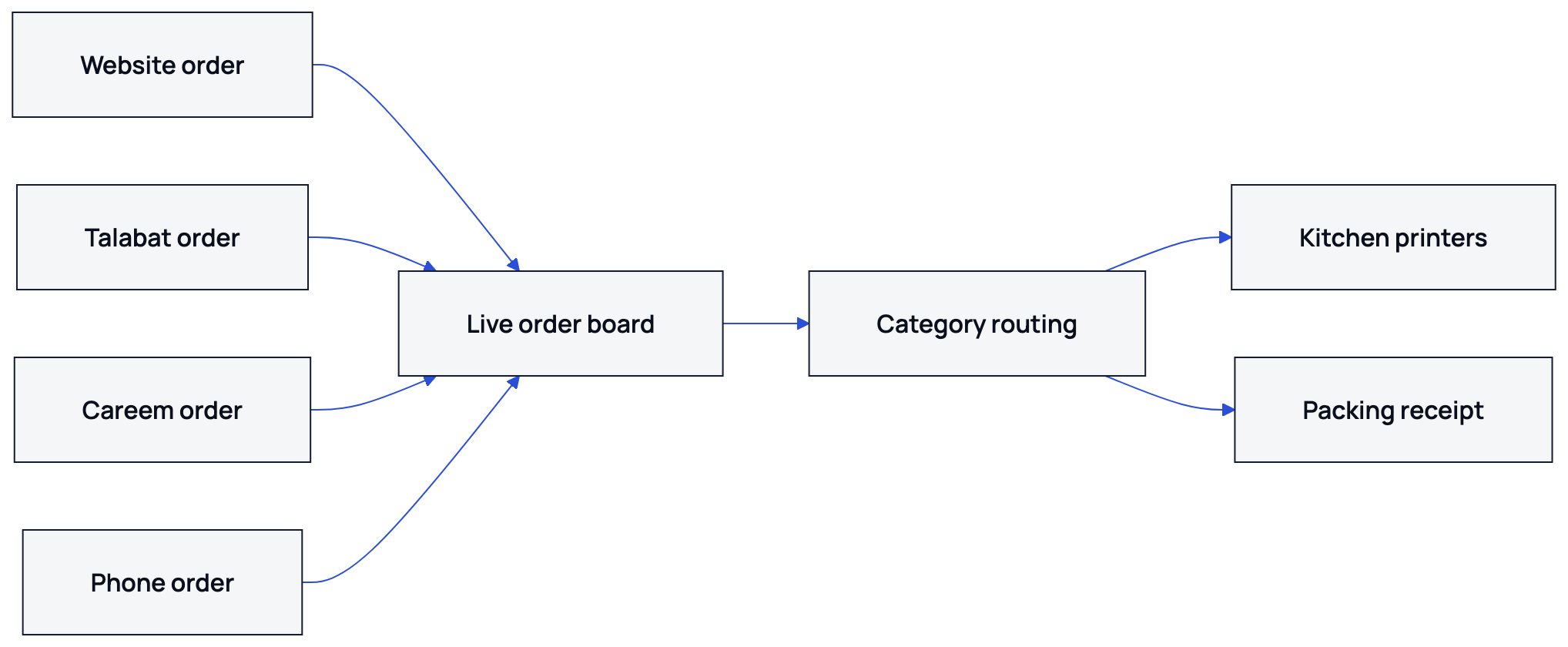
Nexara prints Arabic on ordinary ESC/POS thermal printers, with English available on the same ticket. Tickets wait in the print queue if a printer is temporarily unavailable. The team can re-route that printer's categories from the dashboard, or automatic failover can send them to a configured backup printer. The order board itself needs a connection, so a phone hotspot next to the printer PC is the sensible backup.
See the detailed operating checklist in printer category routing.
What changed during the illustrative dinner rush?
In this example, the supervisor stopped copying orders between screens. At 19:00, the five brands still had separate customer menus, but the branch had one live order board and defined printer categories. A phone order was entered through the call center, where the caller's saved addresses and past orders appeared by phone number. Talabat and Careem orders arrived through their intake connections.
The team used the brand label for packing and the category ticket for production. When the desserts brand paused its pistachio cup, the item was switched off for the relevant branch menu rather than removed from every catalogue. When the fryer printer stopped answering, the manager sent its categories to the backup printer from the dashboard.
| Operating point | Illustrative before | Illustrative after |
|---|---|---|
| Order entry points | 40 website, 55 Talabat, 35 Careem and 50 phone orders handled across separate intake points | 180 orders visible on one live order board |
| Menu price changes | Shared soft-drink price edited on each channel | Shared price edited once in the catalogue |
| Kitchen destinations | Staff called the station for each ticket | Categories routed to the relevant printers |
| Ticket handling | Tickets retyped or called out between stations | Source, brand and category visible before production |
| Brand count | Five virtual brands | Five virtual brands |
The order count did not disappear because software was added. The change was that the source, brand, product category and destination were visible before the ticket reached the cook. That is the standard to test in your own kitchen.
What should another cloud kitchen check first?
- List every brand, channel and branch that will operate from the kitchen.
- Create one product catalogue with clear categories, modifiers, prices and availability.
- Assign each brand to the menu channels where customers should see it.
- Name printer destinations by work area, then switch on the product categories each printer should receive.
- Place one test order from the website and enter one phone order before the first service.
Nexara is the order and operations layer beside the till. It is not a POS or cash register. The cashier can continue recording the day's net sale and reconciliation while orders, menus, printing, customers and delivery operations are handled in the platform.
Talabat and Careem retain their own commission on orders they bring. Nexara charges 0% commission on the restaurant's own website, app and call-center orders.
For the wider operating model, read cloud kitchens in Jordan or review Nexara's features.
What to remember
- Five virtual brands can keep separate menus while sharing one branch catalogue.
- Website, phone, Talabat and Careem orders can arrive on one live order board.
- Category routing sends tickets to the relevant kitchen printer in Arabic or English.
- Test each brand, menu, channel and printer route before the first busy service.
Questions people ask
Can one kitchen run several restaurant brands with Nexara?
Yes. The catalogue supports separate products, categories, modifiers, menu lists and channels, while orders from the branch arrive on one live order board.
Does each virtual brand need a separate catalogue?
No. Shared products can stay in one catalogue while each brand receives its own menu list, storefront selection and channel availability.
Does Nexara receive Talabat and Careem orders?
Nexara has verified intake connections for Talabat and Careem, including order intake and status flows. Activation depends on the partner and market.
Can orders print to different kitchen stations?
Yes. Routing can use the branch, printer group and product category. Arabic and English can print on standard ESC/POS thermal printers.
What happens if a kitchen printer stops working?
The order remains on the board and the ticket waits in a queue. Staff can re-route categories from the dashboard, or use a configured backup printer.
Does Nexara replace the cash register?
No. Nexara sits beside the till as the order and operations layer. The cashier continues recording sales and reconciliation.