How does one branch handle a one-hour lunch rush?
At 1 pm, one kitchen faces four streams of orders in one hour. The branch needs one clear view before the rush starts.
Nexara gives a branch one live order board for phone, website, table QR, Talabat and Careem orders, then routes Arabic tickets to kitchen printers. Nexara is the restaurant order and operations platform built in Amman, Jordan. It sits beside the till, not in place of it. The branch itself still needs a connection to view the board.
Figures in this post are illustrative examples, not a client's actual results.
What was happening at 1 pm?
The fictional branch sits near a university in Amman. It sells burgers, shawerma, fries and drinks for delivery, pickup and dine-in. At 1 pm, students leave lectures, staff take lunch and delivery demand rises at the same time.
Before using Nexara, the branch manager treated each channel as a separate stream. Phone orders were written down. Website orders appeared in a browser tab. Talabat and Careem tickets arrived through their partner tools. QR table orders were checked by a waiter. The kitchen had to compare screens and paper before starting a ticket.
| Illustrative peak-hour source | Orders in one hour | Main risk |
|---|---|---|
| Phone | 18 | Caller details typed twice |
| Branded website | 26 | Order missed in a browser tab |
| Table QR | 14 | Table number unclear |
| Talabat and Careem | 32 | Tickets checked in separate tools |
That illustrative total is 90 orders in one hour. The problem is not only volume. It is the handoff from customer to cashier, from cashier to kitchen and from kitchen to dispatch.
How does one board reduce channel confusion?
Nexara places phone, website, app, table QR, Talabat and Careem orders in one live queue for the branch. Each order keeps its type, such as delivery, pickup or dine-in, and its current status. The manager can search order history and filter the board instead of asking four people which tickets have started.
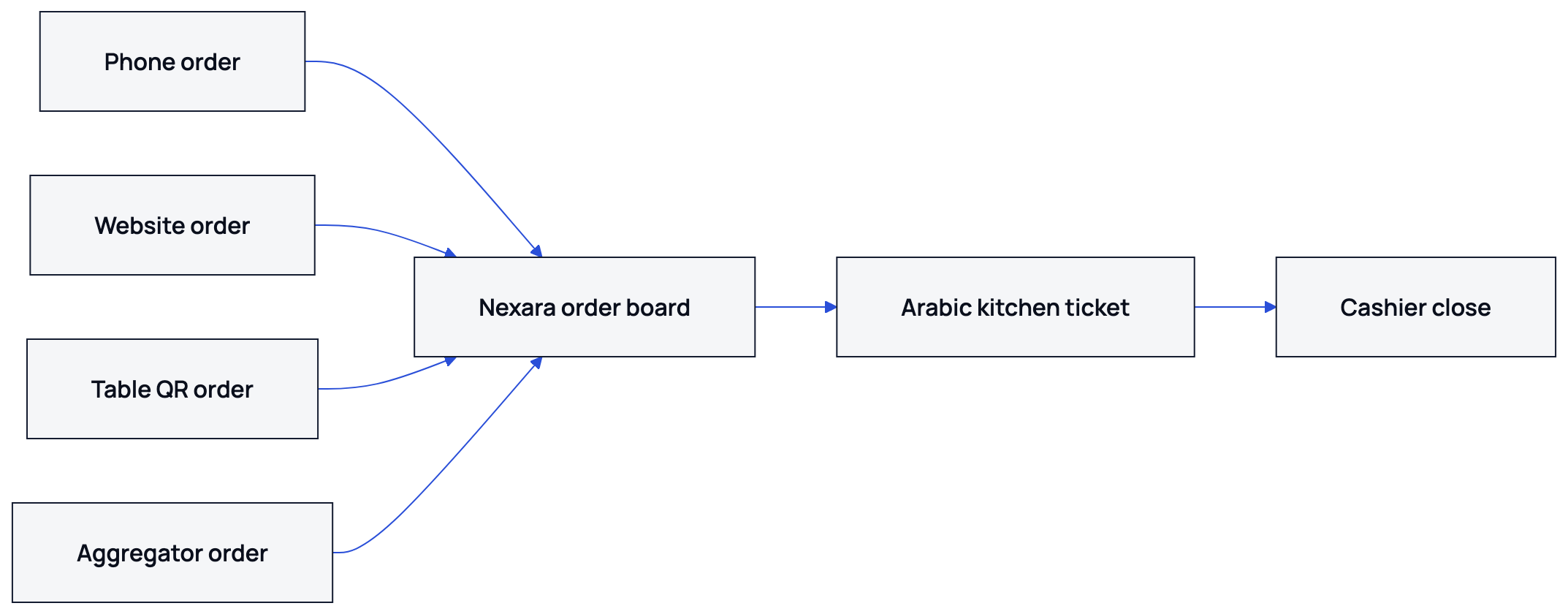
The board gives the shift one place to check orders that just arrived, orders being confirmed, orders in the kitchen and orders ready to hand over. A customer tracking link can show progress for supported website orders. The cashier closes the till and records the day's takings at close. Nexara is the order and operations layer beside the till, not a cash register.
For the fictional branch, the manager's first peak-hour rule is simple: accept the order once, confirm it on the board and let the kitchen work from the printed ticket. Nobody copies a Talabat item into a notebook or reads a QR order aloud from a customer's phone.
How does printer routing help the kitchen?
A fast-food kitchen usually needs different information at different stations. Nexara can send tickets by branch, station type, location and what the item is. A kitchen printer can receive food items, while a bar printer receives drinks. Category toggles control what each printer prints.
The branch uses ordinary ESC/POS thermal printers over USB or a network. Arabic item and modifier names print as Arabic, and English can appear on the same ticket. Tickets wait in the print queue and print in order when the printer answers. If a printer stops, the ticket remains on the board. The manager can re-route its categories from the dashboard, or use automatic failover to a configured backup printer. Orders also remain in the cloud queue while the branch connection is down, and the printer catches up when the connection returns.
| Station | Categories sent | Ticket detail |
|---|---|---|
| Kitchen | Burgers and shawerma | Items, modifiers and order type |
| Fryer | Fries and sides | Quantity and preparation notes |
| Bar | Drinks | Cold and hot drink choices |
| Cashier | Receipts | Payment and pickup detail |
At 1 pm, each station receives the categories it needs. Priority affects the order tickets print, while every accepted ticket remains accounted for.
Where do QR tables fit during the rush?
QR dine-in ordering gives each table a printed code. A guest scans it, chooses items on a phone and submits the order. The ticket carries the table number, so the team can connect the food to the right place without relying on a verbal handoff.
Guests can claim their own items on a shared bill, which supports splitting by claimed items plus tip. Dine-in payment is handled through the available pay-at-the-table flow. QR dine-in starts on Nexara's Growth plan, and the branch must have dine-in enabled.
In the illustrative branch, the waiter checks the service board for table status while the kitchen reads the printed ticket. The waiter knows where the order belongs, and the cook knows what to prepare.
How should the branch assign people for one hour?
NexaraFlow can assign timed tasks by role, including recurring branch checks and inspection work. It is not a staff scheduling or time-clock tool. For this case, the manager uses NexaraFlow for a short operating checklist rather than pretending software can create extra hands.
- Before 12:45, the manager checks printer status and confirms the kitchen categories assigned to each printer.
- At 12:50, the cashier checks that website, phone and aggregator orders are visible on the branch board.
- At 12:55, the waiter confirms that table QR cards are readable and table numbers match the floor.
- From 1:00 to 2:00, one person watches the live board, one handles phone orders and one checks ready orders against order type.
- After 2:00, the manager reviews order history, failed orders and channel performance before the next busy period.
Assign a named person to each check before service. One person watches flow, one handles customers and kitchen staff work from printed tickets instead of messages passed across the room.
What changed in the illustrative case?
In the fictional branch, the manager compares the same one-hour window before and after changing the order path. The figures are illustrative and show how an owner might measure the result, not a Nexara customer result.
| Measure | Before | With one board and routing |
|---|---|---|
| Orders visible in one place | Website and phone only | All four channels |
| Manual channel checks | Four separate checks | One branch board |
| Kitchen ticket groups | Mixed paper batches | Food, fryer and bar |
| Table identification | Verbal confirmation | Table number on ticket |
| Peak-hour exception | Manager searches for ticket | Ticket stays on board for re-route |
The branch should check its own facts after a trial: cancelled orders, failed orders, preparation status, channel mix and cashier reconciliation. Nexara has report tabs across orders, products, customers, channels, delivery, money and operations. Offline cash-register operation is not provided.
Four customer channels can feed one operating view, while the kitchen receives printed work by category. That is the part to inspect during the rush.
What should an owner check before copying this setup?
- List every channel that can create an order at your branch.
- Confirm which printers are ESC/POS and whether they connect by USB or network.
- Group menu categories by the station that prepares them.
- Print an Arabic ticket with modifiers before the first peak service.
- Choose one person to watch the live board and review failed or cancelled orders after service.
Nexara is built in Amman for restaurants and multi-branch chains. Deployments are in Jordan today, while the platform is built for restaurants in Jordan and the Arabic-speaking Middle East. Talabat and Careem activation depends on partner approval and market conditions. A free plan is available, followed by paid plans per branch in Jordanian dinar. Current rates are available on request.
Read the practical guide to handling peak hours, then review printer category routing. For the wider product view, see Nexara features and Nexara integrations. To discuss your branch, message the founder through Nexara contact or WhatsApp via nexaratech.io.
What to remember
- Four order channels need one operating view during a peak hour.
- Category routing sends each kitchen station the ticket information it needs.
- QR table numbers reduce verbal handoffs for dine-in orders.
- Measure failed orders, cancellations and reconciliation after the rush.
Questions people ask
Can one Nexara board receive orders from four channels?
Yes. The live queue can receive phone, website or app, table QR, Talabat and Careem orders for a branch.
Does Nexara replace the restaurant cash register?
No. Nexara is the order and operations layer beside the till. The cashier records the day's takings at close for reconciliation.
Can Nexara print Arabic kitchen tickets?
Yes. Nexara prints Arabic and English tickets on standard ESC/POS thermal printers over USB or a network.
What happens if a kitchen printer stops?
The ticket stays on the board and in the print queue. The manager can re-route categories from the dashboard, or use a configured backup printer.
Can customers order from a QR table?
Yes, when dine-in is enabled. Guests scan the table code, order from their phones and receive a ticket carrying the table number.
Does Nexara provide staff scheduling?
No. NexaraFlow assigns timed operational tasks by role, but it is not a staff scheduling or time-clock system.
Does Nexara work offline during a rush?
Orders keep arriving in the cloud queue while the connection is down, and the printer catches up when it returns. The board needs a connection, so a phone hotspot is a sensible backup.