Handling peak hours: the order board, printer and phone at 8 pm
At 8 pm, the problem is rarely one huge order. The phone rings while Talabat, Careem, your website and dine-in tables all ask the kitchen for attention.
Nexara is a restaurant order and operations platform built in Amman, Jordan, that puts phone, website, app, table QR, Talabat and Careem orders on one live board and prints Arabic kitchen tickets. It has no offline cash register or kitchen display screens. Start with a branch setup check, then have a short WhatsApp conversation.
Figures in this post are illustrative examples, not a client's actual results.
What should you check before the rush starts?
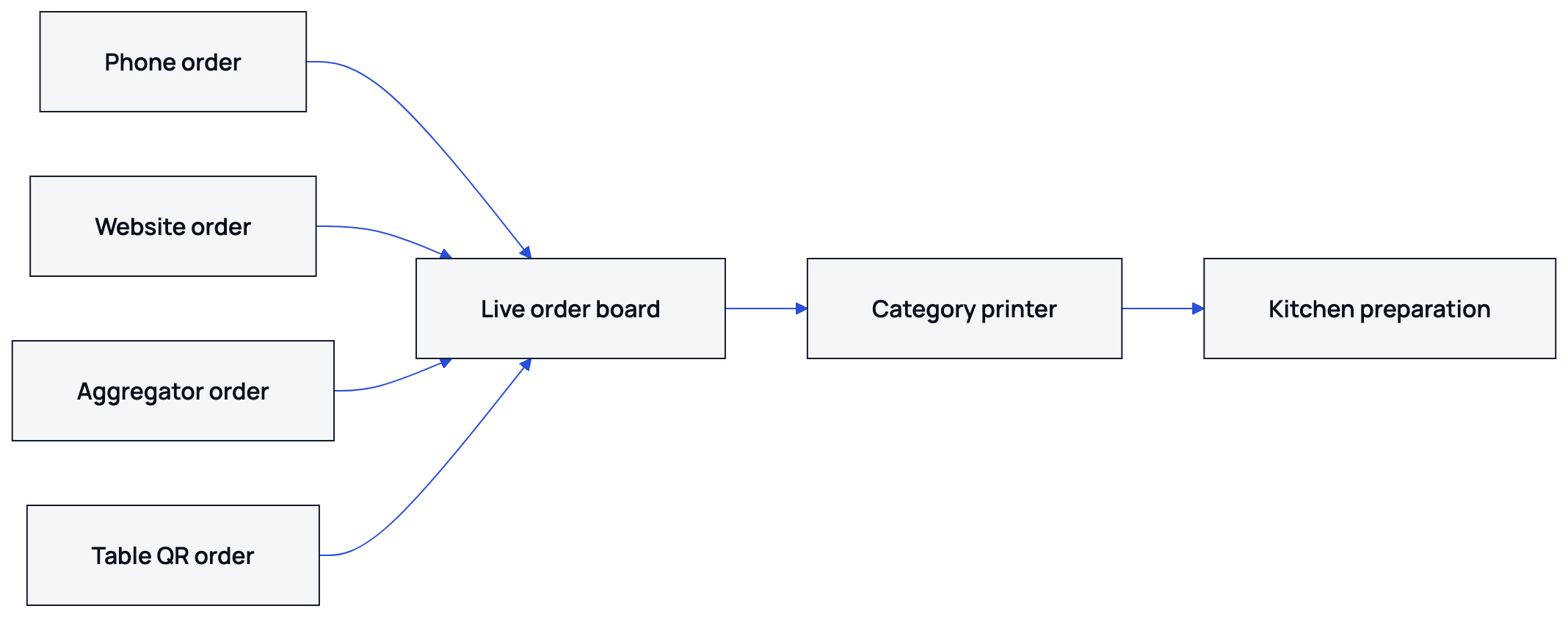
Peak-hour control begins before the first ticket arrives. Check the branch's printer, menu availability and phone process while the kitchen is still quiet. Nexara's order board shows orders from the call center, website, app, table QR, Talabat and Careem in one branch queue.
- Confirm the branch has power, internet and the Nexara Printing desktop agent open on the print computer.
- Print a test ticket in Arabic and English. Use an ordinary ESC/POS thermal printer over USB or network.
- Check that kitchen, bar and cashier printers have the right product categories enabled.
- Review sold-out items and branch availability before customers place orders.
- Put the phone agent on the call-center screen and keep a written fallback for addresses and special instructions.
Nexara has spent a year on its printing engine. Arabic text is rendered for standard thermal printers, so an Arabic item or modifier does not depend on the printer having an Arabic font. The kitchen lead or manager should read the test ticket from the pass, not only from the screen.
How should every channel reach the kitchen?
The safest peak-hour path is one order board, one clear status process and category-based printing. Staff should not copy an order from a phone into another screen when the order is already in Nexara. Confirm it, prepare it and move it through the agreed statuses: pending, confirmed, preparing, ready for pickup and delivery.
| Channel | What staff checks | Kitchen result |
|---|---|---|
| Phone | Caller, address and payment choice | Order appears on the board and prints by category |
| Website or app | Item availability and customer phone | Own-channel order enters the same branch queue |
| Talabat or Careem | Provider status and item availability | Inbound order is received without manual retyping |
| Table QR | Table number and claimed items | Ticket prints with the table number |
The cashier records the day's net sale and reconciles cash at close, while the kitchen team works from the live order board and printed tickets.
See the guide to the live order board for status handling, and the explanation of printer category routing for assigning items to kitchen, bar or cashier printers.
How can the kitchen handle multiplying kitchen tickets?
Give each station one visible rule: read the ticket, mark the order as preparing, make the assigned items, then mark it ready when the complete order reaches the pass. Printing categories prevent a drinks station from receiving every kitchen item. A backup printer can receive categories when the main printer fails.
- Keep the pass clear enough for staff to compare the printed ticket with the packed order.
- Use the board's search and filters to find an order instead of printing a second copy.
- If a printer dies, re-route its categories from the dashboard or use the configured backup printer.
- Reprint manually only after checking whether the original ticket is already in the kitchen.
- Use the oldest confirmed order as the next decision point, unless a manager has set a different priority.
Tickets remain on the board when a printer is unavailable. They wait in a queue and can be re-routed from the dashboard. Nexara supports automatic failover to a backup printer where one is configured. Priority changes print order, not whether a ticket prints.
The board itself needs an internet connection. Orders continue arriving in the cloud queue while the branch connection is down, and the printer catches up after reconnection. A phone hotspot beside the print computer is a reliable fallback. Nexara does not provide an offline cash register.
How can the phone keep up at 8 pm?
A phone queue needs a fixed intake script. The call-center screen lets an agent search by phone number, see saved addresses and past orders, and place the new order. The call-center feature is on the Pro plan. The workflow of taking phone orders is not gated, but the Nexara call-center screen is on Pro.
- Answer with the branch name and ask whether the order is delivery or pickup.
- Search the caller's number before typing a new address.
- Repeat items, modifiers, address and payment choice once before confirming.
- Place the order on the board, then tell the caller the promised preparation or collection time.
- Log a complaint from the call screen instead of leaving it in a notebook.
For an illustrative timeline, imagine a branch handling 120 orders between 7:30 pm and 9:00 pm, with the busiest 30 minutes carrying 45 orders. At 8:00 pm, assign one person to answer calls and another to watch the board. The kitchen leads control the pass. These figures are planning examples, not Nexara results.
| Time | Manager checks | Team action |
|---|---|---|
| 7:30 pm | Printer test and item availability | Prepare stations and confirm the channel script |
| 7:55 pm | Open orders and printer status | Move staff to the pass and phone position |
| 8:00 pm | Oldest pending and preparing orders | Confirm tickets, avoid duplicate entry |
| 8:30 pm | Ready orders and failed orders | Re-route printer categories if needed |
| 9:00 pm | Unfinished orders and cash notes | Close the rush with reconciliation checks |
When should a restaurant pause a channel?
Pausing a channel is a capacity decision, not a reaction to a noisy phone. First check whether the bottleneck is cooking or packing. If the kitchen can cook but delivery cannot collect, changing the delivery process may help. If a menu item is unavailable, switch its branch availability off instead of accepting orders the team cannot complete.
Careem's integration includes a pause capability, and Talabat and Careem order intake depends on partner activation and market rules. Nexara does not offer Jahez or DHUB integrations today. The restaurant should confirm channel status in the relevant partner account and keep the website menu accurate.
- Pause an external channel when the promised preparation time is no longer credible.
- Turn off a sold-out item at branch level before pausing the entire menu.
- Keep own-channel orders open only when the team can fulfil them at the stated time.
- Tell phone callers the actual delay before accepting payment or confirming collection.
- Resume one channel at a time and watch the board for duplicate or delayed orders.
Nexara's own website, installable app and call center carry 0% commission on the restaurant's own orders. Talabat and Careem retain their own commissions on orders they bring.
Current plans include a free plan and paid plans per branch in Jordanian dinar. Current rates are available on request.
What should the manager review after the rush?
Do the review while the details are fresh. Nexara provides report tabs across orders, products, customers, channels, delivery, money and operations. Compare cancelled, failed, preparing and ready orders by channel. Then check which items caused repeated substitutions or printer confusion.
- Count orders still open at closing and identify their channel.
- Check failed orders and the reason recorded by staff.
- Review printer status and any tickets that needed manual re-routing.
- Compare the menu availability changes with items the kitchen actually ran out of.
- Write one change for the next peak period, such as a different printer category or phone role.
NexaraFlow can assign recurring, timed tasks such as morning inventory and daily inspection on the Pro plan. That gives the manager a repeatable pre-rush check rather than relying on memory during a Thursday service.
For a Jordanian example of peak-hour operating decisions, read the university district peak-hours case study. For the full feature list, see Nexara restaurant features. To discuss your branch setup, message Nexara through nexaratech.io.
What to remember
- Prepare the printer, menu availability and phone role before 8 pm.
- Put every channel on one live order board and print by category.
- Re-route a failed printer before retyping or duplicating an order.
- Pause a channel when its promised time is no longer credible.
- Review failed, cancelled and unfinished orders before the next rush.
Questions people ask
What are the best restaurant peak hour tips?
Test printers, confirm item availability, assign one person to the order board and use a fixed phone script. Keep every channel on one queue so staff do not retype orders.
How does Nexara handle a restaurant order surge?
Orders from the phone, website, app, table QR, Talabat and Careem arrive in one live branch queue. Tickets route to the configured printer categories, and failed printers can be re-routed or failed over to a backup.
What happens if the kitchen printer stops working?
The order stays on the board and the ticket waits in a queue. Staff can re-route that printer's categories from the dashboard, or use automatic failover where a backup printer is configured.
Can Nexara work when the internet goes down?
Orders keep arriving in the cloud queue while the connection is down, and the printer catches up after reconnection. The board needs a connection, so a phone hotspot near the print computer is a sensible backup.
Does Nexara include kitchen display screens?
No. Nexara gives the team a live order board and printed kitchen tickets instead of kitchen display screens.
Can a restaurant pause Talabat or Careem during a rush?
Careem's integration includes a pause capability. Channel activation and controls depend on the partner and market, so the restaurant should check its partner account.
Does Nexara send WhatsApp order notifications?
No. Nexara includes a WhatsApp conversation inbox for call-center roles, but it does not send order-notification messages through WhatsApp.