How should a restaurant run feedback calls after delivery?
A customer saying “fine” gives your team little to act on. Give them room to tell you what arrived without having to argue with the kitchen.

Nexara gives your team delivered-order feedback tasks with item summaries, as a restaurant order and operations platform built in Amman, Jordan. Staff make the calls. Start by assigning a caller, choosing a suitable time after the meal, and using an open script to record feedback and route complaints to a named owner.
Figures in this post are illustrative examples, not a client's actual results.
When should you make the post delivery call?
Start from delivered orders, not orders leaving the kitchen. Out for delivery and delivered are separate statuses in Nexara. Neither tells you whether the customer has finished eating, so the caller still needs to check whether the timing suits them.
As a starting policy, try calling 30 to 60 minutes after delivery and keep a routine conversation under 90 seconds unless the customer wants to explain a problem. Adjust this trial policy around your menu and customer preferences.
- For late-night deliveries, avoid an unexpected call near midnight. Ask for a suitable time when contact is necessary.
- If the customer is still eating, offer to end the call. A rating collected before the meal is finished tells you little.
- If nobody answers, record no answer. Make at most 1 later attempt under this example policy, rather than repeatedly dialing.
- If the customer declines feedback calls, respect that preference and keep it visible in your team's contact process.
Do not wait for a feedback window when a complaint has already arrived. A missing meal needs action while the customer can still use the replacement. The companion guide to feedback calls after delivery covers the wider follow-up process.
Who should call, and what should they see first?
Before dialing, check the branch and order reference, then read the items ordered. Nexara's feedback-call tasks include item summaries. Its customer records also contain addresses and order history, so staff have context without asking the customer to reconstruct the purchase.
Assign a trained call-center agent or supervisor who can listen without defending the kitchen. Keep them outside the packing rush. Someone handling an active dispute should not also collect a supposedly independent assessment of that dispute.
Keep access limited to staff who need it. Confirm you are speaking to the person who placed the order before discussing details. Do not read an address aloud just to prove you know the customer, and do not turn a service call into a sales pitch.
Set the caller's authority before the shift: what they may offer under your policy, and who approves anything beyond it. The caller should be able to promise an update from a named colleague. They should not promise a refund they cannot authorize.
What restaurant feedback call script should staff use?
Use this suggested wording for staff calls. Ask the opening question before suggesting possible faults. “It arrived hot, right?” asks the customer to agree with you. “How was the food when it arrived?” leaves the answer open.
- Introduce yourself and ask permission: “Hello, this is [name] from [restaurant]. Am I speaking with the person who placed the delivery order? Is now a good time for a short check on your meal?”
- Confirm they have eaten: “Have you had a chance to eat yet?” If not, end politely or agree on a better time.
- Start openly: “How was the food when it arrived?” Pause. Do not supply the answer or interrupt the first criticism.
- Follow the customer's answer: “Which item was affected?” Then ask only the relevant detail, such as whether it was cold on arrival or something was missing.
- Check completeness: “Did you receive everything you ordered, including the extras?” Skip this if the customer has already explained a missing-item problem.
- Invite the less comfortable answer: “Was there anything you would want us to do differently next time?” Do not attach a discount to a positive response.
- Read back the issue and agree on action: “I have recorded [issue]. [Owner] will check it and update you by [agreed time], even if the review is still open. Is that a suitable time to contact you?”
- Close without pressure: “Thank you for explaining it. I have noted what we agreed.” If there was no issue, thank them and end the call.
Use the customer's preferred language. For a restaurant serving Jordanian customers, prepare the script in natural Arabic as well as English. Nexara's dashboard supports both languages, but the caller still needs to speak naturally rather than read software labels aloud.
What should the caller record?
Record enough detail for the next person to act without repeating the interview. Nexara provides feedback-call reporting and PDF output. Use the table below as a recommended staff record, keeping details in your team's approved notes process where needed.
| Record | What belongs in it |
|---|---|
| Order context | Order reference, branch, delivery status, and affected item or modifier. |
| Contact outcome | Reached, no answer, declined, still eating, or callback agreed. Keep these separate from satisfaction. |
| Customer's account | A short factual description. Preserve their wording where useful; do not replace it with a judgment about their attitude. |
| Verification | What the order record shows, what staff have checked, and what remains unconfirmed. |
| Requested outcome | What the customer wants, without treating the request as an approved remedy. |
| Follow-up | Named owner, promised update time, and case reference when a complaint needs action. |
Keep unanswered calls in their own category. Separate attempted calls from completed conversations when reviewing results. If you only call regulars or customers whose deliveries went smoothly, the results describe that selected group.
Keep notes focused on the meal and the agreed follow-up. Leave out unnecessary personal information and speculation about the customer.
When does feedback become a complaint case?
Open a case when an issue needs investigation, a remedy, or a promised follow-up. A preference can remain feedback. For a missing paid item, agree on a remedy and record its completion before closing the case.
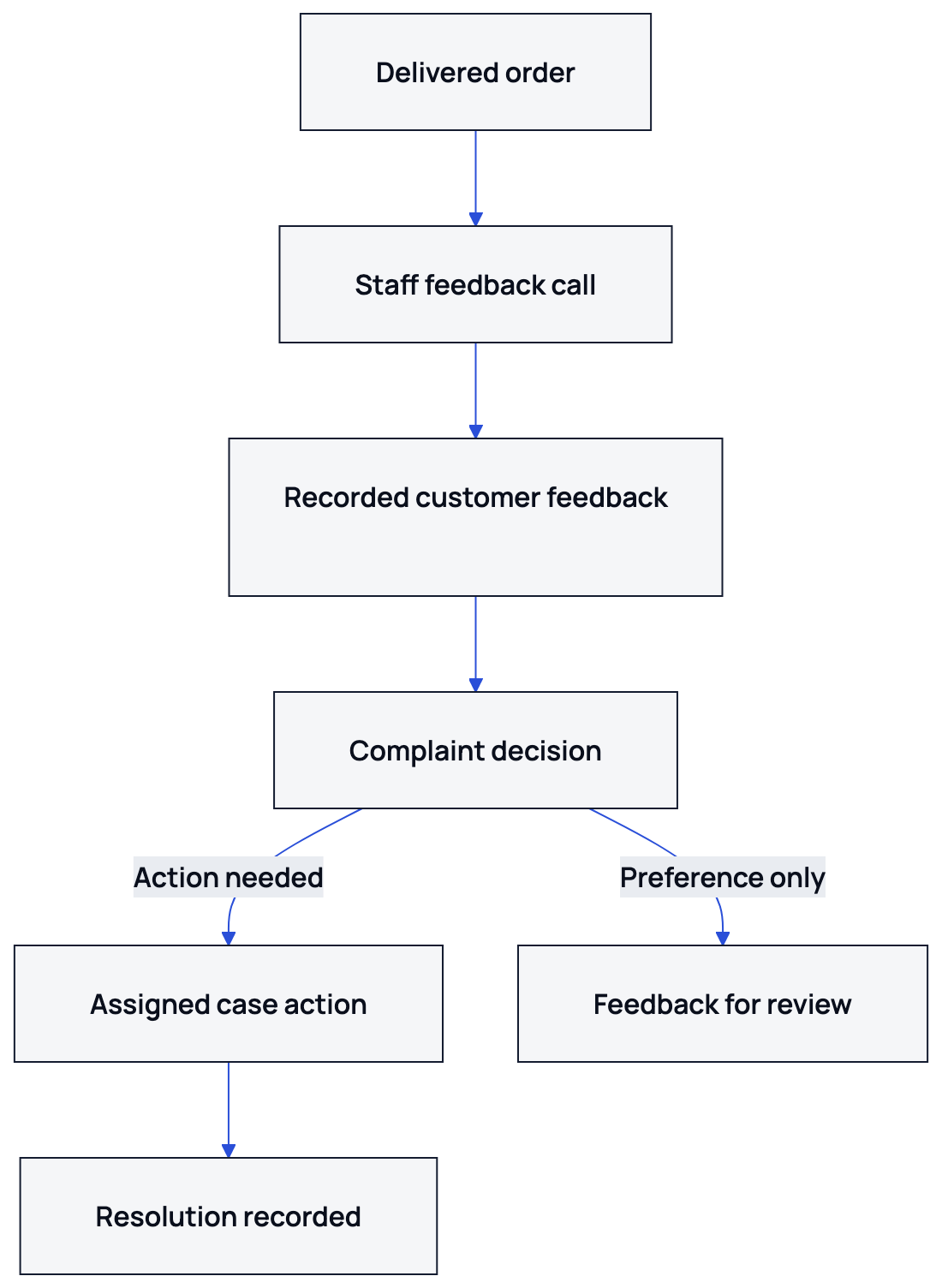
Staff record the customer's feedback, then assign any complaint that needs action and document its resolution.
| What the customer reports | Recommended action |
|---|---|
| A taste preference with no requested remedy | Record feedback for menu review. Open a case if the customer asks for follow-up or describes a recurring unresolved problem. |
| A missing item, wrong modifier, or cold meal on arrival | Open a case, identify the affected item, and assign someone to check the order and agree on a remedy. |
| A disputed charge or refund request | Open a case for the authorized manager. Do not promise payment action before verification. |
| Suspected food poisoning, an allergen concern, or a foreign object | Escalate immediately to the responsible manager under your food-safety procedure. Do not wait for a routine service deadline. |
| A replacement or callback already promised but not received | Continue the existing case where possible and escalate the missed commitment. |
Nexara complaint cases support a routing ladder, SLA minutes, photos, and sync to workflow tasks. Case indicators include open, breached, escalated, and resolved. Use the SLA deadline to set when the assigned person must act or respond.
Choose deadlines your team can meet and define who receives an escalation. Record the remedy delivered and the customer's update before marking a case resolved. The guide to complaint cases and SLA ownership explains the handoff in more detail.
How should you review the week's feedback?
At each shift handover, review unresolved promises before looking at ratings. In the weekly review, group recurring issues by item or branch and check the underlying orders. For repeated reports of leaking sauce containers, assign a manager to inspect the containers and packing process.
Nexara provides Complaints and Customer Reviews report tabs, and Bloub can generate feedback reports. Use them to organize the review. Give each agreed check a named owner and a review date, then compare later feedback with the changes made. The feedback and complaint tools in Nexara show where this work fits.
What to remember
- Call after delivery, check whether the customer has eaten, and ask permission to continue.
- Use open wording before asking about specific faults.
- Separate unanswered calls from satisfaction, and record facts rather than judgments.
- Check recurring feedback against order records before deciding what to change.
- To set up this process, use the WhatsApp button below to discuss your branch's feedback calls with the founder of Nexara at nexaratech.io.
Questions people ask
How long should a restaurant feedback call take?
Under the illustrative policy above, aim for under 90 seconds when there is no problem. Let a customer finish explaining a complaint rather than cutting them off to meet a call-duration target.
Should we call every delivery customer?
Only if your team can handle the follow-up responsibly. Otherwise, select calls across different shifts and order types, and report that the findings come from a sample.
What should we say when the customer only says fine?
Try a neutral follow-up such as “Was there anything you would want us to do differently next time?” If they do not want to continue, thank them and stop.
Should we offer a discount during a feedback call?
Keep discounts separate from requests for feedback. If a complaint warrants compensation, follow your restaurant's approval policy and record the remedy separately from the feedback, regardless of whether the customer's assessment is positive or negative.
Does Nexara make the feedback calls automatically?
Staff make the calls. Nexara supplies delivered-order feedback tasks with item summaries and reporting to help your team organize the follow-up.
Can a caller log a complaint without leaving the call screen?
Nexara supports complaint logging from its call-center screen. Call Center is a Pro-plan feature, so confirm access when discussing your branch setup.