How to choose a restaurant POS in Jordan: 12 vendor questions
A tidy demo tells you little about a printer failure during Thursday service. During the walkthrough, make the vendor handle a missing modifier while Talabat delivery tickets are waiting.
Nexara gives restaurants one order board and Arabic kitchen printing as a restaurant order and operations platform built in Amman, Jordan. It sits beside your till rather than replacing the cash register. Before choosing restaurant software, ask each vendor to demonstrate your order-to-close workflow and put costs and responsibilities in writing.
What are you buying, and what stays separate?
Use the same questions with every vendor. Write down what worked in the demonstration and what still needs setup. In Nexara, the order board and cashier reconciliation report cover different parts of the shift; your walkthrough should reach both.
1. Does this replace my till or handle orders beside it?
Follow an order from entry to kitchen ticket, then watch the cashier's closing work. Which system records the sale? Will staff enter anything twice?
Nexara brings orders into one live queue per branch. The cashier records the day's net sale at close for reconciliation. There is a cashier reconciliation report, but no accounting or ERP connectors. Run through that handover with your existing till before signing.
2. Do you provide JoFotara e-invoicing today?
Ask to see the invoice submission process. Your accountant should check which system will meet your business's invoicing requirements.
Nexara prints Arabic receipts and provides financial reports; it does not provide JoFotara e-invoicing. Keep the accountant-approved invoicing arrangement as a separate requirement in the proposal.
Which orders and payments actually reach the branch?
3. Which channels are connected, and what passes through?
An incoming order should carry the correct modifiers to the correct branch. Then cancel it and watch what changes. Booking a courier for your own order is a separate test.
Talabat and Careem orders join phone, website, installable app and table QR orders in Nexara's branch queue. Talabat supports inbound cancellations and status updates; Careem also supplies driver information and item replacements. Activation depends on partner approval. Careem Express, TopDeliver and Nashmi handle own-order dispatch. Jahez and DHUB are not offered today.
The Talabat and Careem order intake details distinguish orders coming in from deliveries going out.
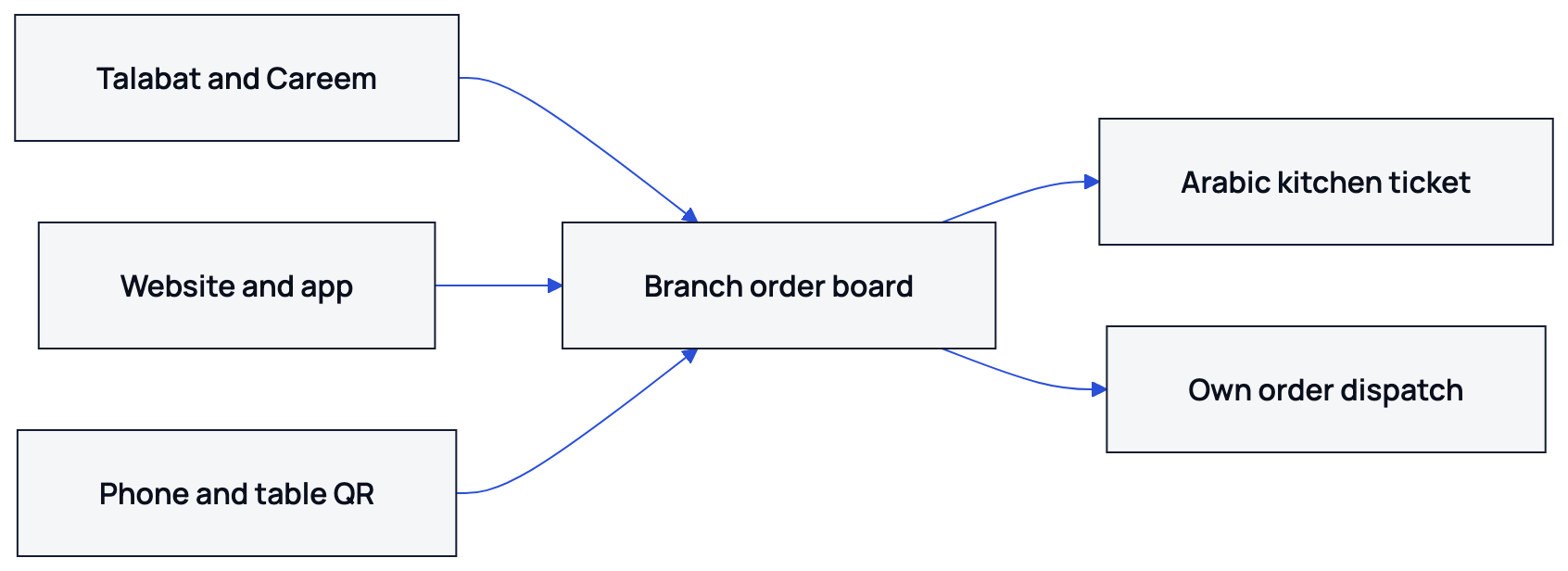
Orders meet on the branch board, with kitchen printing and dispatch for the restaurant's own deliveries.
4. How do direct ordering and customer payments work?
Place a test order on a phone and look at the payment choices the customer actually sees.
Nexara's branded website installs from the browser as an app. Checkout supports cash on delivery or pickup, and online card payment through HyperPay when enabled. Dine-in uses payment at the counter. CliQ is not a storefront checkout method. Nexara takes 0% commission on its website, app and call-center orders; subscription and payment-provider fees are separate. Talabat and Careem retain their own commissions.
Will tickets print correctly when service gets messy?
5. Will my kitchen printers handle Arabic and modifiers?
Bring your printer model and a menu item with Arabic modifiers. Read the printed paper, then check that each kitchen category reaches its intended printer.
Nexara supports standard ESC/POS thermal printers over USB or network through its Windows printing app. Arabic prints correctly, with English available on the same ticket. Category routing sends items to the right printer, and automatic redelivery does not produce duplicate tickets. Kitchen work uses printed tickets rather than dedicated kitchen display screens; Bluetooth printers are unsupported. Confirm your equipment and printing needs in the quote.
6. What happens if the internet or a printer stops?
These are different failures. Ask the vendor to disconnect the branch internet, restore it, then take a printer out of service. Watch where each waiting ticket goes.
With Nexara, orders keep arriving in the cloud queue during a branch outage, and printing catches up after reconnection. The board needs internet. A failed printer's tickets wait; staff can re-route categories from the dashboard, or use automatic failover where a backup printer is configured. Test a phone hotspot beside the printer PC as a backup connection.
Can staff run your menu and service model?
7. Can availability and staff access differ by branch?
Let a branch manager mark an item unavailable, then check the affected menu. Repeat with a restricted staff login. Head-office access should not be your only test account.
Nexara menus support modifiers, channel-specific visibility and per-branch availability. Talabat and Careem support catalogue updates. Users have roles and branch assignments, with permissions controlling access. Inventory covers recipes and counts, including waste and purchase orders. Bring one of your recipes to see how staff would maintain it.
8. Does it support the way we take and serve orders?
Use a familiar service situation: a caller giving a saved address, or guests ordering from a table. Check that the quoted plan includes the features your staff need.
Nexara's call-center lookup shows saved addresses and past orders on Pro. Table QR ordering starts on Growth and supports splitting a shared bill by claimed items. Booking tools such as reservations and waitlists, along with staff scheduling and time clocks, remain outside Nexara's scope. The Nexara feature catalogue covers the wider product.
Can you check the day's work and follow up?
9. Can reports explain a discrepancy at closing?
After cancelling a test order, find it in the history and relevant report. If the channel view differs from the closing figures, the vendor should explain why.
Nexara reports cover orders and channels, with End of Day, Failed Orders and Cashier Reconciliation tabs. Order history has search and filters. Bloub answers questions from company numbers with citations: ask what a branch sold last Friday, then open the cited records. Scheduled email reports and automatic payment matching against provider settlements are not available.
10. What happens after a customer reports a problem?
Log a complaint and follow it to the person responsible. You should be able to see what happens when nobody resolves it.
Delivered orders can populate Nexara feedback-call tasks. Complaints become cases with routing, SLA clocks and escalation. NexaraFlow provides recurring, role-based timed tasks on Pro. WhatsApp serves as a call-center conversation inbox rather than an order-notification sender. Promotions include a loyalty-points type, but no full loyalty programme.
What will the contract and handover leave you with?
11. Who helps us go live and handles a service problem?
The proposal should name who sets up the printer and who follows up on marketplace approval. Ask when you can reach support during your opening hours.
Nexara support is by WhatsApp and email during Amman hours, in Arabic and English, and founder Issa Al-Dalu answers. An ordering link can go live on signup day; printer setup usually happens the same day. Deployment is cloud-only. The Nexara support contact details list the available channels.
12. What is the full cost, and can we leave with our data?
Nexara has a free plan plus paid plans per branch in Jordanian dinar, with current rates on request. Nothing auto-renews. The first payment has a 14-day money-back policy. Orders and customers can be exported as CSV; deletion is available on request within 30 days.
Before signing, keep a written record of these 12 answers:
- Who records the day's net sale and completes the till-to-Nexara handover.
- Which JoFotara arrangement your accountant approves.
- Who handles Talabat and Careem outlet mapping and approval.
- Which checkout methods work, and what payment-provider fees apply.
- Whether your ESC/POS printer produces readable Arabic modifier tickets.
- What staff do during an internet outage or printer failure.
- How branch availability and restricted logins behave.
- Which plan covers your call-center or table QR service.
- Where cancellations appear in closing reports.
- Who receives complaints and handles overdue cases.
- When support is available and who sets up local printers.
- The JOD subscription quote, payment method and cancellation terms, including CSV export and deletion.
What to remember
- Buy against demonstrated workflows, not feature names.
- Keep till functions and JoFotara requirements separate from Nexara's order layer.
- Test Arabic printing and outage recovery on your own equipment.
- Get plan scope, support responsibilities and exit terms in writing.
Questions people ask
What should I send a vendor before a restaurant software demo?
Send your printer model and a menu item with Arabic modifiers, plus the order channels you use. Ask to see those inputs used in the branch workflow.
Can I take my customer records with me if I leave Nexara?
Yes. The restaurant owns its data, and orders and customers can be exported as CSV. Nexara never markets to your customers.
Can I test Nexara without entering a payment card?
Yes. Signup uses a phone number and SMS code, without a card. The trial provides 14 days of Growth, then drops to Free.
What should my accountant check during the demo?
Ask them to follow the actual invoice submission process and the cashier's closing work. They should confirm which system handles each requirement before you sign.
Can I pay my Nexara subscription through CliQ?
Yes, subscription billing supports CliQ transfer. The Nexara billing FAQ explains payment confirmation and the applicable billing hours.
What will I pay besides commission on direct orders?
Budget for the subscription and any payment-provider fees. Nexara's commission on your website, app and call-center orders is 0%; marketplace orders still carry the marketplace's own commission.