How to log a complaint, route it, and close it with a record
A customer calls back about a missing item, and the person who promised to help has left for the day. Without a clear record, the next person starts the investigation from zero.
Nexara supports call-screen complaint logging, routing, SLA clocks, photos, escalation and case statuses as a restaurant order and operations platform built in Amman, Jordan. Call-center access and workflows require Pro. Start with founder-assisted setup on WhatsApp to agree how your restaurant will handle complaints from the first call through resolution.
How do you capture the complaint at first contact?
Nexara supports complaint logging from the call screen. Staff can look up a customer by phone and see saved addresses and past orders. That context helps when a caller says something was missing: the person answering can review what the customer previously ordered while listening to the report.
As a staff routine, establish what the customer expected and what arrived. A useful description is “Customer reports a missing side dish.” “Bad order” gives the next colleague very little to work with. Separate what the customer reports from what the restaurant has confirmed, especially when the kitchen and delivery team still need to check.
For walk-in reports, ask founder Issa Al-Dalu to demonstrate an appropriate handling process during assisted setup on WhatsApp. Bring a typical counter complaint so the discussion covers how staff should capture it and hand it over. Agree the recording method before training the team.
Complaints can also emerge during follow-up. Nexara’s feedback-call tasks come from delivered orders and include item summaries. The guide to feedback calls after delivery explains that starting point.
How does Nexara put the complaint in the right hands?
Nexara complaint cases have a routing ladder and can sync to workflow tasks. The practical outcome is a complaint connected to work that staff must handle. During founder-assisted setup, work through who should respond first and who should take over when the issue needs more authority.
Use the missing-item scenario to test that handover. Your restaurant should decide who checks packing and who can authorise a remedy. Those are operating responsibilities to agree with your team. Ask Issa to demonstrate how the routing ladder supports your agreed process, including what staff see when a complaint escalates.
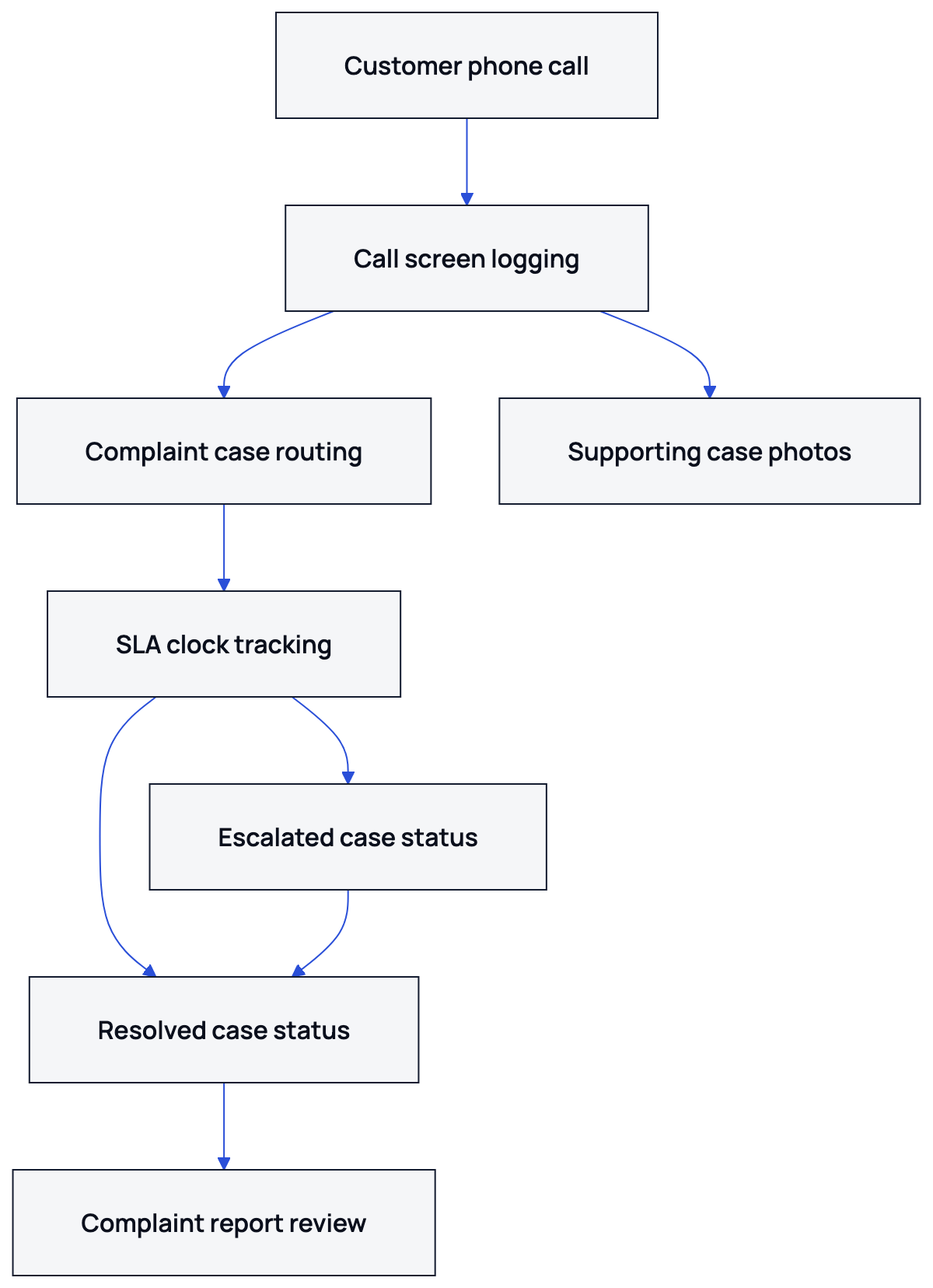
NexaraFlow provides role-scoped task lists and branch assignments, and includes an Escalated Complaint template. Complaint cases can sync to these workflow tasks. The Nexara features page describes how complaints sit alongside customer records and the restaurant’s other daily work.
What do the SLA clock and case labels mean?
Complaint cases support SLA minutes and show open, breached, escalated and resolved chips. An SLA is the handling time target used to track whether work is overdue. Ask Issa to demonstrate the clock and escalation behaviour against your restaurant’s intended response routine during setup.
| Case label | What it signals |
|---|---|
| Open | The complaint remains open for handling. |
| Breached | The complaint has breached its SLA time target. |
| Escalated | The complaint has reached escalation. |
| Resolved | The complaint is marked resolved. |
For the restaurant, decide what response staff owe the customer while an investigation continues. Someone waiting for a missing item needs an update even if the kitchen has not finished checking. Make that update part of your handling policy, and choose a target your team can actually work to during service.
During a shift handover, use the case labels to focus attention on unfinished handling. A breached case calls for checking what is holding up the response; an escalated case calls for checking who is taking the next action. The guide to complaint cases and SLA clocks covers timed handling in more detail.
What should you keep with the complaint?
Nexara complaint cases support photos. A picture of damaged packaging or food condition can help the person investigating understand the report. Ask for evidence that helps answer a specific question. A missing item may still need a conversation with the packing team even when the customer provides a photograph.
Use the following as a recommended staff evidence routine. During founder-assisted setup, agree where your team will document its written findings and closing record, and have Issa demonstrate that method.
- Describe the customer’s report in plain language, using the item name where known.
- Use customer lookup and past orders to understand the context of the call.
- Add a relevant photo to the complaint case when it helps investigate the issue.
- Document the restaurant’s findings separately from the customer’s initial account, using the recording method agreed during setup.
- Keep a clear account of the action completed and what the customer was told, following your restaurant’s handling policy.
The test for a useful handover is simple: can the next colleague understand what still needs checking? For calls made after delivery, how to run a feedback call gives staff a related routine for listening and following up.
When is a complaint ready to close?
Nexara includes resolved as a complaint case status. A sensible restaurant policy is to treat a complaint as ready for resolution after the agreed action is complete and the outcome has been communicated to the customer. Have Issa demonstrate the resolution process and the agreed recording method during setup.
Under that recommended policy, a promise to investigate means more work remains. If the restaurant promises a replacement, staff should confirm that the agreed action happened before treating the matter as finished. This gives the shift manager a concrete basis for deciding whether the handling is complete.
If the customer cannot be reached, your restaurant should have a rule for further contact attempts and manager review. One recommended approach is to keep the matter open for follow-up or seek higher-level handling. Agree that policy with the team, including who can decide that further contact is no longer practical.
How do you review complaints after closure?
Nexara includes a Complaints report tab and a separate Customer Reviews report tab. During assisted setup, ask Issa to walk through the Complaints report with a sample case so you can see the information available for your review routine.
Bloub can retrieve open complaints and complaint details. That gives a manager a way to find outstanding cases and inspect a particular complaint. Use those capabilities when checking what still needs attention after a busy shift.
For your restaurant’s review meeting, compare the reported problem with what staff established and what action followed, using the recording method agreed during setup. If missing-item complaints recur, inspect the packing handover. If an investigation repeatedly stalls, revisit who has authority to act. Choose a specific operating change and check it at the next review.
For your restaurant’s complaint setup with Nexara at nexaratech.io, message founder Issa Al-Dalu on WhatsApp with a typical complaint and your intended handover process.
What to remember
- Log phone complaints from the call screen, using customer lookup and past orders for context.
- Agree complaint routing and handover responsibilities during founder-assisted setup.
- Use SLA clocks and case labels to follow handling, with photos where useful.
- Set a restaurant closure policy and agree how staff will document the completed action.
- Use the Complaints report and Bloub complaint retrieval in your review routine.
Questions people ask
How do complaint cases work in Nexara from first call to closure?
Staff can log complaints from the call screen. Cases support routing, SLA clocks, photos, escalation and workflow-task sync, with open, breached, escalated and resolved labels.
Can I see a caller’s past orders before logging a complaint?
Yes. Nexara’s call center supports customer lookup by phone and shows saved addresses and past orders.
How should I handle a complaint from a walk-in customer?
Bring a typical walk-in report to founder-assisted setup on WhatsApp. Ask Issa to demonstrate how your staff should capture and hand over that report using an agreed process.
Can I add photos to a Nexara complaint case?
Yes, complaint cases support photos. Use an image when it helps explain or investigate the reported issue.
Can Nexara complaints become workflow tasks?
Yes, complaint cases can sync to workflow tasks. NexaraFlow includes an Escalated Complaint template and role-scoped task lists.
What should a restaurant write before closing a complaint?
As a recommended handling policy, document the action completed and the outcome communicated to the customer. Agree the recording method during founder-assisted setup, alongside how your team will use resolved status.