How to Send Drinks to the Bar Printer
A mixed order should not leave the cashier with one pile of paper and a runner guessing which items belong at the bar. Drinks need to reach the bar, food needs to reach the kitchen, and both teams need the same order reference.
Nexara is a restaurant order and operations platform built in Amman, Jordan. It routes order tickets by product category to the printer group assigned to that category, so drinks can print at the bar while food prints in the kitchen. Arabic and English item names can appear on standard ESC/POS thermal tickets.
Figures in this post are illustrative examples, not a client's actual results.
What does printer routing by category do?
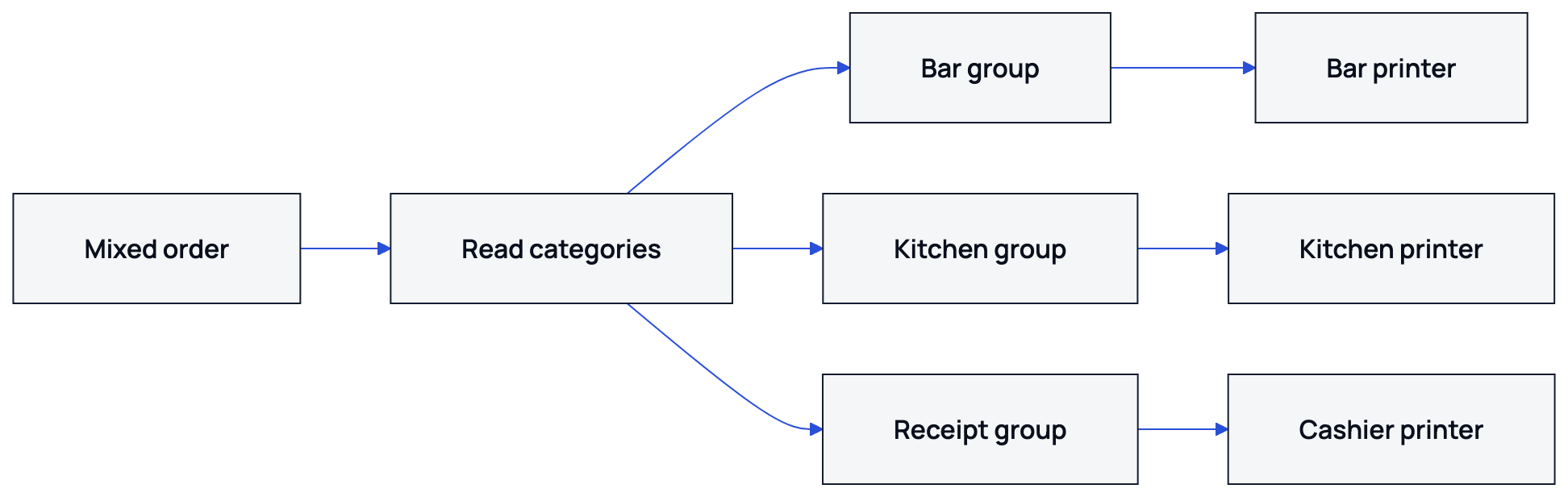
Printer routing by category tells the branch where each part of an order should print. A bar printer can receive beverages, a kitchen printer can receive meals, and a cashier printer can receive the receipt. The order remains one order on Nexara's Live Orders board, even when its tickets print at different stations.
Nexara sits beside the till as the restaurant's order and operations layer. It receives orders from the phone, website, app, table QR, Talabat and Careem into one branch queue, then prints kitchen and receipt tickets in Arabic and English on standard ESC/POS thermal printers.
| Order category | Printer group | What the station receives |
|---|---|---|
| Drinks | Bar | Drink items and configured category items |
| Food | Kitchen | Food items and configured category items |
| Receipt | Cashier | The customer or payment receipt |
Each printer can be switched on for the menu categories it should print. The station receives the items assigned to that printer, while the order reference connects the separate tickets.
How do you prepare categories and printer groups?
Start with the menu categories already used by the branch. Typical categories might include Hot Drinks, Cold Drinks, Burgers and Sides. The exact dashboard button names and sequence vary by branch setup, so use founder-assisted setup on WhatsApp when the screen does not match these outcomes.
- Review the branch menu and identify the categories that should print together.
- Create or confirm the printer groups needed by the branch, such as Bar, Kitchen and Cashier.
- Connect the standard ESC/POS thermal printers used at each station through the Nexara Printing desktop agent.
- Assign the relevant menu categories to each printer.
- Choose the appropriate Arabic and English ticket template for each printer.
- Run a mixed-order test before the next busy service.
For the hardware connection, use a standard ESC/POS thermal printer over USB or a network connection. Nexara does not provide proprietary terminals or hardware bundles, and Bluetooth printer support is not available.
What should print from a mixed order?
Test with an order that includes at least one drink and one food item. For example, use one iced coffee, one lemonade, one burger and one side. This is a test order, not a customer's real order. The bar printer should receive the two drink lines, and the kitchen printer should receive the burger and side lines.
| Test item | Category | Expected printer |
|---|---|---|
| Iced coffee | Cold Drinks | Bar printer |
| Lemonade | Cold Drinks | Bar printer |
| Burger | Burgers | Kitchen printer |
| Fries | Sides | Kitchen printer |
The numbers below are an illustrative example, not a client's actual figures. If a ticket averages 4 to 12 JOD, the test checks whether each physical station receives the work assigned to its categories.
- Confirm the same order number appears on the bar, kitchen and receipt tickets where configured.
- Check that each ticket contains only the menu categories switched on for its printer.
- Check that food modifiers appear on the kitchen ticket when configured for that printer's category selection.
- Read Arabic names and modifiers on both tickets.
- Confirm the receipt printer receives the receipt if one is configured.
- Cancel the test order or mark it according to the branch's normal test procedure.
Nexara's one queue covers call-center, website, app, table QR, Careem and Talabat orders. The source channel does not change the station logic. A burger from the website and a burger from Talabat can follow the same food category assignment.
How do you change routing when a printer is down?
When a bar printer stops responding, the order stays on the board and the ticket waits in the print queue instead of disappearing. From the dashboard, you can send that printer's categories to another printer. Where a backup printer is configured, Nexara also supports automatic failover.
- Check the printer status and confirm the problem is limited to that station.
- Choose an available printer that can physically serve the affected station.
- Re-route the bar categories to that printer from the dashboard.
- Print or reprint the waiting ticket once the replacement path is ready.
- Restore the original category assignment after the failed printer is working.
- Run one drink-only test before returning to normal service.
Tickets can queue while the branch connection is down and print when the connection returns. The order board itself needs a connection, so a phone hotspot beside the printer computer is the sensible backup. Nexara does not provide an offline cash register.
If you need help identifying the reroute controls, send the branch details to the founder on WhatsApp. Support is available through WhatsApp and email during Amman hours, in Arabic or English.
What should you check before service?
Before service, check the physical printers against the category assignments. A category can be correct in the menu and still need checking at the station where the work is done.
- The bar printer has paper and is reachable through USB or the network.
- The kitchen printer has paper and is reachable through USB or the network.
- Every drink category is assigned to the bar printer group.
- Every food category is assigned to the kitchen printer group.
- Arabic and English item names are readable.
- Modifiers appear at the station configured for those categories.
- A mixed-order test produces separate tickets.
- A backup printer is known to the manager if the main printer fails.
Read the printer category routing guide for category assignments. For hardware connection, see how to connect a thermal printer. The Nexara printing engine overview covers the wider printing and order workflow.
What to remember
- Use menu categories to separate bar work from kitchen work.
- Assign each category to the printer group that prepares it.
- Test one mixed order before service and check Arabic modifiers.
- Re-route categories from the dashboard when a printer is down.
- Ask Nexara's founder for assisted setup when your branch needs help.
Questions people ask
Can I send drinks to a separate bar printer?
Yes. Nexara supports printer groups and product-category routing. Assign drink categories to the bar printer and food categories to the kitchen printer, then confirm the result with a mixed-order test.
Will the bar and kitchen tickets have the same order number?
They remain parts of the same order, so the station tickets can be matched by their order reference. The order also remains visible on the branch's Live Orders board.
Can Arabic names print on kitchen tickets?
Yes. Nexara supports Arabic thermal printing on standard ESC/POS printers, with English available on the same ticket.
What happens if the bar printer stops working?
The order stays on the board and the ticket waits in the print queue. You can re-route the affected categories from the dashboard, or use automatic failover where a backup printer is configured.
Why does Nexara print tickets instead of showing them on a kitchen screen?
Nexara's verified station workflow uses printed tickets. Kitchen display screens are not a current Nexara capability.
Can Nexara print from Talabat and Careem orders?
Nexara receives Talabat and Careem orders into the branch order queue. The same category routing can then send drink and food items to their assigned printers.