How to dispatch website orders with Careem Express
The website order is accepted, but someone still has to get the food to the customer. At a busy branch, that handoff needs an assigned person and a booking the team can check.
Nexara is the restaurant order and operations platform built in Amman, Jordan, for quoting, booking and tracking direct orders with Careem Express, TopDeliver or Nashmi. Courier dispatch is available on Growth and Pro; Free and Starter have no delivery providers. Start with founder-assisted WhatsApp setup, then request a quote and dispatch from the order.
Figures in this post are illustrative examples, not a client's actual results.
1. What should you arrange before the first dispatch?
Choose the branch that will hand over the food and the courier you intend to use. Nexara supports own-order dispatch through Careem Express, TopDeliver and Nashmi. Growth allows 1 delivery provider; Pro allows unlimited providers. Free and Starter have no delivery providers. Nexara has a free plan plus paid plans per branch in JOD, with current rates on request.
Issa Al-Dalu assists with setup on WhatsApp, in Arabic or English. Share your pickup location and preferred provider. The result is a branch that can request a quote and book deliveries through that provider. Staff can practise with a branch order.
Keep the two Careem services separate. Careem order intake brings Careem orders into Nexara. Careem Express dispatch books delivery for an order received through your own channel. The Nexara integrations overview explains both flows.
- Identify who will request courier bookings during service.
- Confirm which branch will prepare and hand over each delivery.
- Have the customer's delivery address and reachable phone number ready.
- Agree who handles a changed address or cancellation after booking.
2. How do you get a delivery quote?
Check the order's branch and destination before requesting the provider's estimate. Nexara supports estimates or quotes for all three couriers. Use the result for that delivery when deciding whether to book.
| Courier | Verified quote and setup capabilities | Delivery follow-up |
|---|---|---|
| Careem Express | Estimates, distance checks and multi-branch quotes | Create, track and cancel deliveries; receive provider updates |
| TopDeliver | Delivery areas, branch connection, immediate-order and pre-order estimates | Create, track and cancel deliveries |
| Nashmi | Branch connection and multi-branch quotes | Dispatch deliveries and receive updates including driver location |
Quotes are available per provider. Open the chosen provider's quote for the branch and use that result when deciding whether to book. Assisted setup shows the dispatcher how to request and read it.
Delivery pricing is separate from Nexara's commission. Nexara supports delivery zones defined by radius, area or polygon. Review delivery zones and fees when deciding where to accept orders and what the customer should pay.
3. How do you dispatch the order?
Nexara lets staff dispatch to Careem Express, TopDeliver or Nashmi from the order. Website orders appear on the branch order board, alongside other channels. Kitchen tickets can print in Arabic and English.
- Open the direct delivery order and check the pickup branch and destination.
- Request an estimate or quote from the connected courier.
- Review the quote and decide whether to book.
- Dispatch through the provider from the order.
- Follow returned updates and coordinate the physical handover.
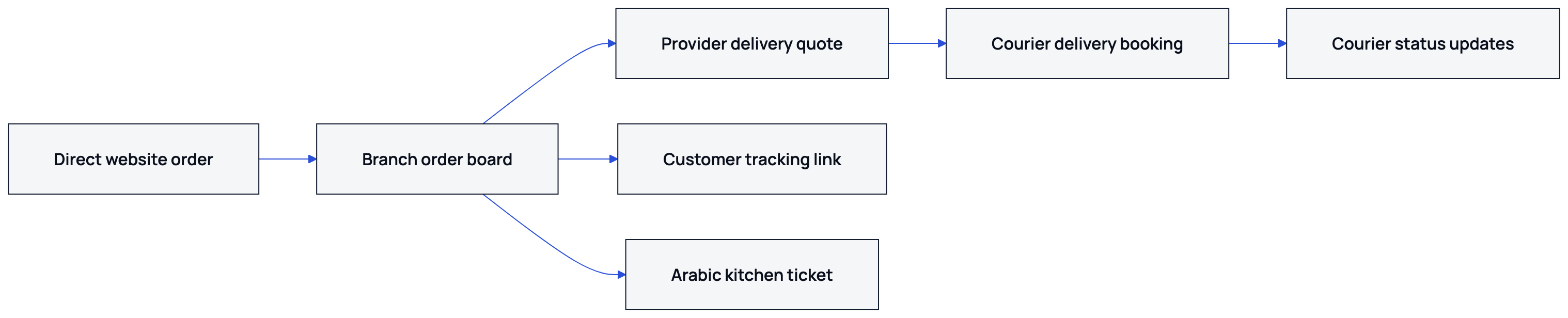
Assign one person to match packed food to the courier's collection. Nexara's order statuses include preparing, ready_for_pickup, out_for_delivery and delivered.
4. Which updates come back, and what does the customer see?
Careem Express and TopDeliver support delivery tracking. Nashmi returns delivery updates that include driver location.
The customer has a Nexara order tracking link. Staff have the branch order board and order history, with search and filters. Customer-facing statuses can show awaiting_payment, pending, confirmed, preparing, ready_for_pickup, out_for_delivery, delivered, cancelled or refunded.
Dispatch includes cancellation. Confirm the provider's cancellation charges and conditions directly with the provider before service starts.
5. How should you calculate the courier cost?
Nexara charges 0% commission on your own website, app and call-center orders. The courier still charges for delivery. Keep that cost separate from your Nexara subscription and the delivery charge collected at checkout.
| Example amount | JOD | Meaning |
|---|---|---|
| Food subtotal | 8.00 | The customer's food order |
| Delivery charged to customer | 1.50 | The amount collected for delivery |
| Courier cost | 2.25 | The assumed courier charge for this example |
| Delivery cost absorbed by restaurant | 0.75 | Courier cost minus the customer's delivery charge |
In this operator example, the customer pays 9.50 JOD and the restaurant covers 0.75 JOD of delivery. Request a provider quote for the actual delivery.
6. What should you check before a busy shift?
Run a test delivery during a quiet period. Cover the quote, booking, returned updates and customer tracking page.
- Check that the intended branch can request a quote.
- Review the quoted amount and customer delivery charge.
- Book the test delivery and locate its returned updates.
- Open the customer tracking link.
- Have the dispatcher explain handover and cancellation to the shift manager.
If your restaurant uses its own fleet, Nexara supports an own-driver role. The guide to dispatching with your own drivers covers that route. Contact Issa Al-Dalu through the WhatsApp step below with your branch location and preferred courier.
What to remember
- Dispatch direct orders through Careem Express, TopDeliver or Nashmi from the Nexara order.
- Check the pickup branch and destination before requesting a provider quote.
- Test the Arabic kitchen ticket, delivery updates and customer tracking link.
- Set the handover and cancellation procedure before the shift.
Questions people ask
How can I send website orders with Careem Express from Nexara?
Nexara supports Careem Express estimates, distance checks, delivery creation, tracking and cancellation for your own orders.
What does the TopDeliver integration support?
It supports branch connection, delivery areas, immediate-order and pre-order estimates, delivery creation, tracking and cancellation.
Who can use Nashmi delivery in Jordan through Nexara?
Nexara supports Nashmi branch connection, delivery dispatch, multi-branch quotes and updates including driver location.
Which Nexara plan do I need for courier dispatch?
Growth includes 1 delivery provider, and Pro supports unlimited providers. Free and Starter have no delivery providers. Current rates are available from the founder on WhatsApp.
When is a courier charge separate from Nexara commission?
Nexara charges 0% commission on your own-channel orders. Courier delivery charges remain separate.
How does the customer follow a direct order?
Nexara provides a customer-facing order tracking link. Include it in your first test delivery.