What to do when the kitchen printer stops: reroute, reprint, recover
A printer failure during the dinner rush is a service problem. The ticket may be waiting while the team assumes the kitchen has seen it.
Nexara gives restaurants a restaurant order and operations platform built in Amman, Jordan, that keeps orders on the live board, prints Arabic and English kitchen tickets, shows printing status, reroutes categories and supports reprints from order history. First check power, paper and the connection. Then reroute the affected categories or reprint the order, and contact Nexara for assisted setup when the branch needs help.
What should the first staff member check?
Start with the physical printer. Check the power light, wall socket, paper roll and printer cover. A thermal printer cannot print with an empty roll, an open cover or no power. Check that the paper feeds from the correct side and that the roll is seated under the guide.
- Look at the printer's power light.
- Confirm the paper roll is present and loaded correctly.
- Close the cover until it latches.
- Check the USB or network connection to the branch computer or network.
- Print a local test page if the printer supports one.
- Tell the manager which printer and category are affected.
Nexara drives standard ESC/POS thermal printers over USB or a network. Epson, Star and Bixolon printers are named in its printing documentation. Nexara does not provide proprietary terminals or hardware bundles, so the restaurant checks the equipment already installed in the kitchen.
How do you see whether Nexara knows about the failure?
Open the printer status view in the Nexara dashboard and identify the branch printer named in the complaint. You can also ask Bloub, Nexara's assistant, a direct question such as, “Which printer is offline?” Bloub returns the printer status for the company, giving the manager a useful next check.
The dashboard shows whether the branch's printing service is connected; a browser tab on the kitchen screen is not the printing service. If the branch computer or print agent is offline, restore that connection first, then check the physical printer again.
Orders keep arriving in the cloud queue while the branch connection is down. The printer catches up when the connection returns. The order board itself needs a connection, so a phone hotspot beside the printer computer is a sensible short-term backup.
How do you reroute tickets to another printer?
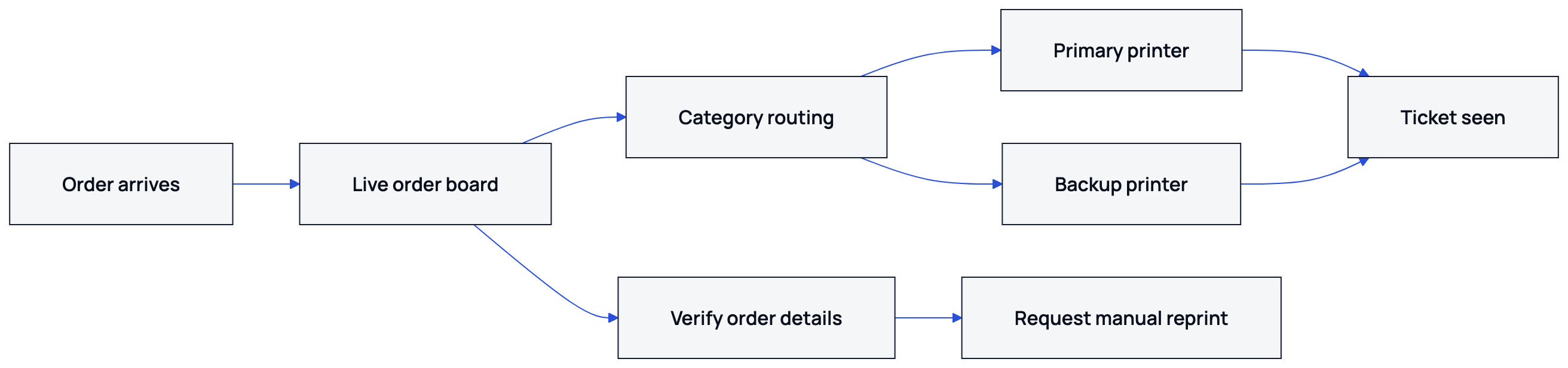
If the printer is still unavailable, reroute its categories from the dashboard to another suitable printer. For example, move hot-food categories from a failed kitchen printer to a working kitchen printer. The team then checks that the affected category prints at the new station.
Nexara supports printer groups such as kitchen, bar and cashier, plus product-category routing and per-printer category toggles. The restaurant receives separate tickets on the printers assigned to those categories.
| Failure | Immediate action | What the team checks next |
|---|---|---|
| Kitchen printer offline | Send its categories to a working kitchen printer | Confirm every affected category prints |
| Bar printer offline | Send bar categories to an agreed backup | Tell bar staff where the tickets now appear |
| One category missing | Check that the category is enabled for the assigned printer | Reprint one order containing that category |
| Several printers affected | Check the branch print agent and network | Use the order board and history while restoring service |
Re-route from the dashboard, or use automatic failover to a backup printer where one is configured. If the branch has no backup assignment or the category mapping is unclear, send the founder a WhatsApp message for assisted setup.
How do you reprint a missing order ticket?
Use Order History to search for the order, confirm the branch and order details, and send a manual reprint after the target printer is ready or the category has been rerouted. Check the order number, customer name and items against the live board before the kitchen starts cooking.
- Find the order in Order History.
- Confirm that it belongs to the affected branch.
- Check the items and modifiers against the customer order.
- Restore or reroute the target printer.
- Send the ticket for manual reprint.
- Watch the printer and hand the ticket to the correct station.
A manual reprint prints a fresh ticket without changing the original order. Nexara's printing behaviour is designed to print tickets once and prevent duplicate delivery. Check the pass before cooking so staff do not prepare the same order twice.
If an order appears on the board but no paper has arrived, wait for kitchen confirmation before starting it. If the printer comes back after the team has already cooked from a handwritten or verbal copy, mark the duplicate ticket clearly and remove it from the work area.
When should the manager call Nexara support?
Ask for assisted setup when the printer status remains wrong after power, paper and connection checks, when categories are assigned to the wrong station, or when the branch needs a backup printer configured. Nexara support is available by WhatsApp and email during Amman hours, in Arabic or English, and the founder answers.
- Send the branch name and affected printer name.
- State whether the printer is USB or network-connected.
- List the categories that failed to print.
- Give one recent order number for checking.
- Attach a photo of the printer lights or error state.
- Say whether the order is still visible on the board.
Nexara runs on a connected order board. For a printer replacement, use a standard ESC/POS thermal printer on USB or network, then ask for assisted configuration.
For background, see Nexara's printer failover runbook, kitchen printing engine guide and internet outage checklist. The printing features page explains where printing sits within the order and operations layer beside the till. Nexara's website is at https://nexaratech.io/.
How do you prevent the next printer failure?
Give each branch a simple printer map. Record the kitchen, bar and cashier assignments, the backup printer and the person who approves a reroute. Keep one spare paper roll beside every thermal printer and check the power cable during opening checks.
- Test the printer before the first order of the day.
- Check the paper roll during opening and closing.
- Keep category assignments documented for each branch.
- Confirm the backup printer can print the required ticket language.
- Teach staff where Order History and printer status are found.
- Review one reprinted ticket before the rush begins.
Arabic tickets and English tickets can appear on the same print setup. Nexara renders Arabic thermal tickets for ordinary ESC/POS printers, so the team should test Arabic item names, modifiers and category headings before service rather than discovering a layout problem at 21:00.
Nexara is built in Amman and its live deployments are in Jordan. It provides a free plan plus paid plans per branch in JOD, with current rates available on request. Free and Starter include 0 printers, Growth includes 1, and Pro includes unlimited printers.
What to remember
- Check power, paper, cover and connection before changing the order flow.
- Keep the order visible until the kitchen confirms the ticket.
- Reroute affected categories to a working printer or use configured automatic failover.
- Use Order History for a controlled manual reprint.
- Document the branch printer map and ask Nexara for assisted setup when the configuration is unclear.
Questions people ask
What should I do when my kitchen printer is not printing?
Check power, paper, the cover and the USB or network connection. Then inspect printer status in Nexara, reroute the printer's categories to a working printer, and reprint the order from history.
Can Nexara send tickets to another restaurant printer when one stops?
Automatic failover is available where a backup printer is configured. Otherwise, reroute the printer's categories from the dashboard.
How do I reprint an order ticket in Nexara?
Find the order in Order History, verify the branch and items, make sure the target printer is ready, then send a manual reprint. Check the physical ticket before cooking.
Will an order disappear if the printer fails?
The order remains on the order board and the ticket waits in a queue. Orders continue arriving in the cloud queue during a connection outage, while the board itself requires a connection.
Does Nexara work with ordinary thermal printers?
Nexara drives standard ESC/POS thermal printers over USB or a network. Use a supported wired printer such as an Epson, Star or Bixolon model.
Can Nexara print Arabic kitchen tickets?
Yes. Nexara prints Arabic thermal tickets and can include English on the same ticket.
When should I contact Nexara support about printing?
Contact support when power, paper and connection checks do not solve the issue, or when category routing and backup assignment need changing. WhatsApp and email support are available during Amman hours.