What to do in the first five minutes when the internet drops mid-shift
When the internet drops during the rush, the first decision is simple: keep the kitchen ready, restore one connection, and prevent duplicate tickets.
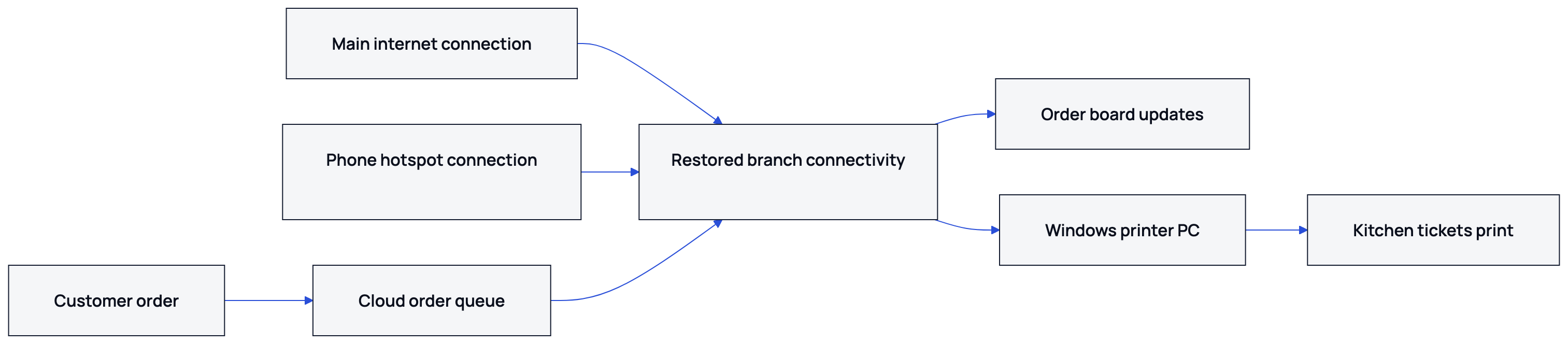
Nexara gives restaurants one cloud queue and Arabic kitchen printing through a restaurant order and operations platform built in Amman, Jordan. The honest limit is that the order board, call-center screen and branch printer need a connection. Put a charged phone hotspot beside the kitchen device, then confirm the board and tickets before cooking.
What keeps working during an outage?
Nexara keeps one live order queue for the website, app, call center, Talabat and Careem orders. Orders remain in the cloud queue while the branch is offline. When the connection returns, the printer catches up. Tickets print in order and print once. Arabic and English can appear on the same kitchen ticket.
| Part of the operation | During the outage | Staff action |
|---|---|---|
| Cloud order queue | Orders remain queued | Keep accepting orders if the channel is open |
| Kitchen printer | Queued tickets wait | Restore the branch connection or use a hotspot |
| Order board | Needs a connection | Connect the board device |
| Call-center screen | Needs a connection | Give the agent the hotspot connection |
| Till and cash handling | Separate from Nexara | Follow the restaurant's normal till procedure |
What should staff do in the first five minutes?
- Name the outage. The shift lead tells the team that the branch connection is down and assigns one person to watch customer calls and one person to check the device that runs Nexara in the kitchen.
- Check the local equipment. Confirm that the kitchen device and thermal printer have power. Check that the printer's USB or network cable is seated, then leave the documented setup unchanged.
- Start a phone hotspot. Put the hotspot next to the kitchen device, connect the device, and open the Nexara dashboard so the board and printer can reconnect. The call-center agent needs this connection too.
- Check the kitchen printer. Watch the queue and let waiting tickets print. Nexara drives ordinary ESC/POS thermal printers already in your kitchen over USB or network. The print agent heartbeat checks presence about every 30 seconds, so allow a short moment after the hotspot connects.
- Tell customers plainly. Say that the branch is experiencing a connection problem and that preparation may take longer. Give an update based on the kitchen's visible ticket load and the next confirmed status.
How should the shift lead handle customers?
Keep the message short and consistent: the branch has a temporary internet problem, the order is being checked, and preparation may take longer. Give a delivery update only after the kitchen or driver confirms it.
- For a phone order, repeat the customer's phone number, address and items before ending the call.
- For a website, app, Talabat or Careem order, check the ticket after the connection returns before asking the kitchen to start a duplicate order.
- For a dine-in QR order, ask the guest to wait while staff confirm the order board and printer.
- If a customer cancels, record the cancellation through the normal order process once the board is available.
The customer record in Nexara includes order history and saved addresses. That helps a call-center agent confirm the caller instead of relying on memory during a busy outage.
What happens when the connection comes back?
Leave the hotspot or main connection live until the kitchen stops receiving tickets. The dashboard queue shows the orders that need attention. Tickets are designed to print once; check the board against physical tickets before asking the kitchen to start a duplicate order.
- Confirm that the order board is receiving current orders.
- Compare the board with the physical tickets that printed.
- Mark orders through their normal preparation status.
- Ask the kitchen to check duplicate-looking tickets before cooking.
- Tell waiting customers the updated preparation position.
- After service, review order history and failed orders for anything that needs follow-up.
If the printer itself remains unavailable, the order stays on the board and the ticket waits in a queue. Staff can re-route that printer's categories from the dashboard to another printer, or use automatic failover to a configured backup printer. A ticket can also be reprinted from the dashboard once the printer is back.
How can a branch prepare before the next outage?
Write the five-minute runbook beside the kitchen device. Test the phone hotspot before the next busy shift, keep the hotspot phone charged, and label the printer's power and network cables. Use standard ESC/POS thermal printers and confirm that Arabic and English tickets print correctly. Nexara's founder, Issa Al-Dalu, answers setup questions through WhatsApp.
| Check before service | What to confirm |
|---|---|
| Hotspot phone | Charged and able to share internet |
| Kitchen device | Nexara dashboard opens after connection |
| Printer | Arabic and English test tickets print |
| Staff roles | One person handles calls and one checks tickets |
| Customer message | Delay wording is agreed before the rush |
- Keep one charged phone available for hotspot use.
- Record the shift lead's responsibility for customer updates.
- Confirm which staff member checks the kitchen device.
- Keep the kitchen device close enough to receive the hotspot.
- Review the restaurant internet outage guide and offline printing guide.
- Use the printer failure runbook for a hardware fault rather than an internet fault.
- Check the Nexara FAQ on printing behaviour and the Issa Al-Dalu founder page before changing a branch setting.
If a required setting is not documented, ask Issa Al-Dalu for assisted setup on WhatsApp instead of inventing a dashboard step. Nexara is available at nexaratech.io.
What to remember
- Orders remain in the cloud queue while the branch connection is down.
- The order board and call-center screen need internet, so keep a charged hotspot phone ready.
- Queued tickets print once when the branch connection reconnects.
- Tell customers about possible delays and check the board before duplicating an order.
Questions people ask
Do restaurant orders disappear when the internet goes down?
Orders keep arriving in Nexara's cloud queue while the branch connection is down. The printer catches up when the connection returns.
Can Nexara print without internet?
The branch printer needs a connection to receive the waiting work. Use a phone hotspot beside the kitchen device so the board, call-center screen and printer can reconnect.
Does the Nexara order board work offline?
The board itself needs a connection. Nexara has no offline cash register or offline order board.
Will queued tickets print twice after reconnection?
No. The print agent keeps a record of printed tickets, so each one prints once. Compare the board with physical tickets before starting duplicate-looking orders.
What if the printer is broken as well as the internet?
The order stays on the board and the ticket waits in a queue. Staff can re-route categories from the dashboard to another printer, use a configured backup printer, or reprint the ticket later.
Can staff keep taking phone orders during an outage?
The Nexara call-center screen needs a connection. Staff can continue their phone procedure, then use a hotspot and confirm that the order appears in the queue before sending it to the kitchen.