How to Mark an Item Sold Out in One Branch Without Touching the Others
A dish sells out at one branch during service while the other kitchens still have it. The useful fix is a branch-level change that protects the shared menu and gives the team one clear item status to check.
Nexara gives you per-branch availability inside a restaurant order and operations platform built in Amman, Jordan. Open Products & Menus, select the product, and use Availability to pause it for one branch while other branches keep selling it. If Availability is missing, message the founder on WhatsApp for assisted setup.
What changes when one branch sells out?
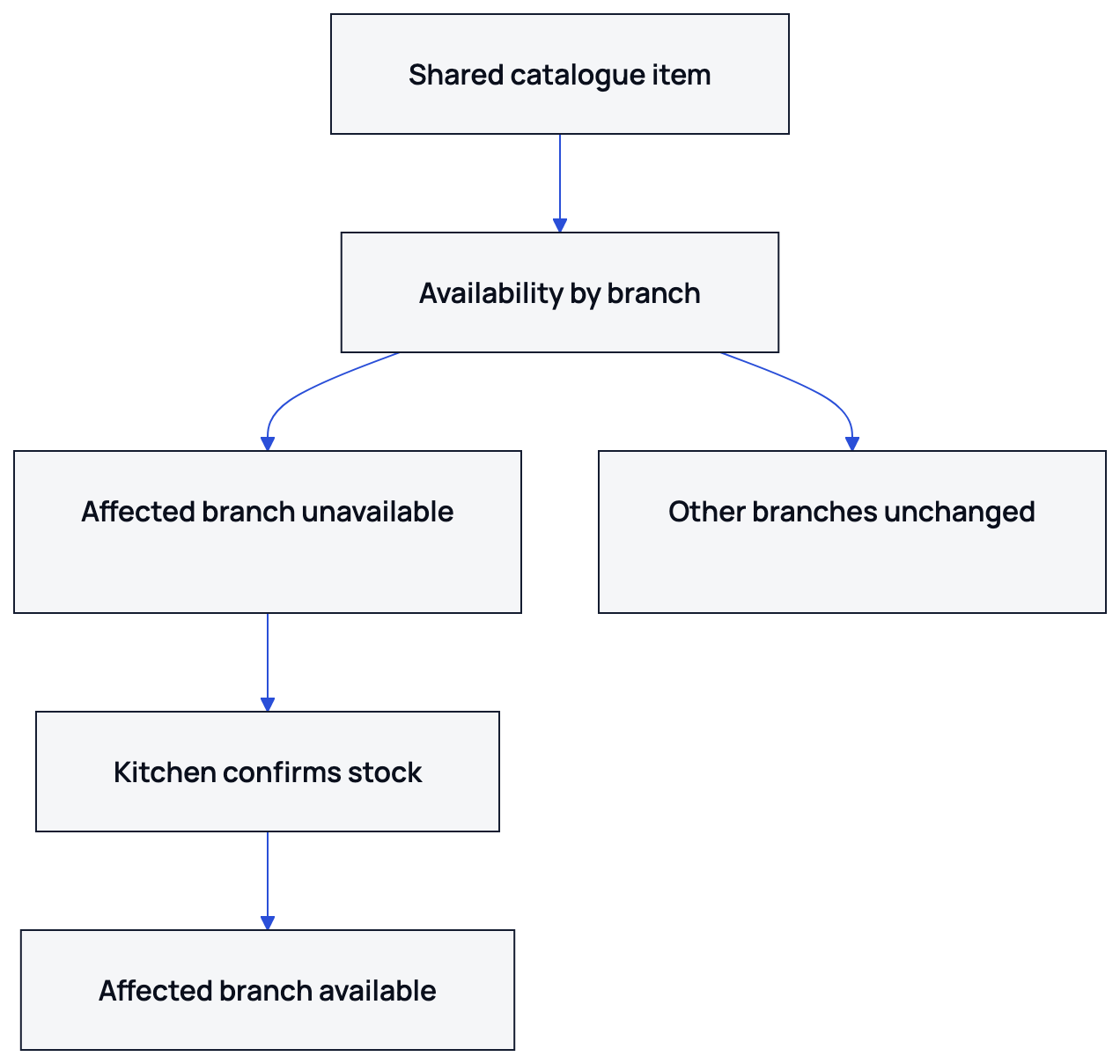
Nexara keeps one catalogue across your ordering channels and lets you set availability by branch. The product stays in the shared catalogue, while the affected branch stops offering it.
| Area | What changes |
|---|---|
| Affected branch | The item becomes unavailable on that branch’s ordering menu. |
| Other branches | The item remains available where stock remains. |
| Customer website | The customer sees the selected branch’s current menu. |
| Call center | The agent works in the selected branch context and sees its item status. |
| Shared catalogue | The product, category, price, modifiers and menu structure remain in place. |
This fits a branch that runs out of chicken, dough, sauce or a prepared side while another kitchen can still prepare the item. You pause the branch availability instead of removing the product from the company menu.
How do you mark the item unavailable for one branch?
Use the product’s Availability area and select the affected branch.
- Open Products & Menus.
- Select the product that has sold out.
- Open Availability.
- Select the affected branch.
- Turn availability off for that branch.
- Save and check the branch storefront.
The product remains available to other branches unless you change their settings. Do not delete the product, category, price or modifiers when only one kitchen has run out.
What does the customer see on the website?
The customer selects or enters a branch, then sees that branch’s menu. At the affected branch, the sold-out item cannot be selected as an available item. At another branch, it can remain orderable.
The storefront is generated from the restaurant menu. Nexara provides a branded ordering website and an installable app from the browser. Branch availability determines what that customer can order from the selected branch.
For the wider catalogue workflow, read how to build your menu once and one menu for every channel.
What does the call center see?
The call center selects the branch for the customer’s order. The agent can look up the caller by phone, see saved addresses and past orders, and place the order from the phone-order screen. The branch’s availability is part of that order context.
If the item is unavailable at that branch, the agent can check another branch or offer an available alternative according to your service policy.
Call center access is a Pro-plan feature. Nexara brings call center, website, app, table QR, Talabat and Careem orders into one live order queue per branch.
How do you make the item available again?
When the kitchen confirms stock, return to Products & Menus, open the product’s Availability area, choose the branch, turn availability back on and save. Check the branch menu before accepting orders again.
- Confirm the kitchen can prepare the item.
- Open Products & Menus.
- Select the product and open Availability.
- Choose the affected branch.
- Turn availability on.
- Save the change.
- Check the customer-facing branch menu.
Re-enabling the item keeps its price, modifiers and category because those remain part of the shared product catalogue.
If it remains hidden, check the selected branch and the menu channel used by the storefront. Use WhatsApp for assisted setup when the account needs help.
What should your team check before changing availability?
- Confirm which branch has run out.
- Check modifiers and add-ons that depend on the missing ingredient.
- Pause the item before accepting more website or phone orders.
- Ask the call center to check the selected branch.
- Re-enable it only after the kitchen confirms stock.
- Check the customer-facing menu after saving.
Nexara also includes inventory features for ingredients, recipes, counts, waste, suppliers, purchase orders and branch stock requests. Availability changes what customers can order; inventory records help the team track the stock behind that decision.
See multi-branch restaurant management in Jordan or review Nexara features.
What if the availability setting is missing?
Nexara supports per-branch availability. Send the founder a WhatsApp message with your restaurant name, branch and item for assisted setup.
Support is available through WhatsApp and email on Amman hours in Arabic or English, and the founder answers support questions directly.
You can start through nexaratech.io and send the availability question with your branch details.
What to remember
- Use Availability when one branch sells out.
- Keep the shared product for branches that still have stock.
- Check the website and call-center branch context.
- Re-enable the item after the kitchen confirms stock.
- Use WhatsApp for assisted setup if the control is missing.
Questions people ask
Can I mark an item sold out in only one branch?
Yes. Nexara supports per-branch availability, so an item can be unavailable at one branch while remaining available at others.
Will marking an item unavailable delete it from the menu?
No. The shared product, category, price and modifiers remain in the catalogue. Only the selected branch’s availability changes.
What does the customer see when an item sells out?
The customer sees the selected branch’s menu with the item unavailable there. Another branch can continue showing it if it remains available.
Does the call center see branch availability?
Yes. The agent takes the order in the selected branch context. Call center access is a Pro-plan feature.
Can I turn the item back on later?
Yes. Open Products & Menus, select the product, open Availability, enable it for the branch, save, and check the storefront.
How does WhatsApp help when an item setting is missing?
Nexara’s WhatsApp module is a conversation inbox for call-center roles. You can message the founder with your restaurant name, branch and item for assisted setup.
Can Nexara manage availability for Talabat and Careem?
Nexara supports Talabat and Careem order intake, catalogue push and availability push. Activation depends on partner approval and market setup.