How to Train Restaurant Staff on New Software Quickly
A new system usually fails during 21:00 on a Thursday, when a cashier is trying to remember the order flow and the kitchen is waiting for a ticket. The answer is shorter practice, clearer roles, and one controlled first shift.
Nexara is a restaurant order and operations platform built in Amman, Jordan. It sits beside the till, giving cashiers and kitchen staff one order flow, Arabic and English screens, and kitchen printing. Train each role on its real work, rehearse five common orders, then start with one supported shift. Founder-led setup helps, but staff still need practice.
Figures in this post are illustrative examples, not a client's actual results.
What should each role learn first?
Do not train the whole team on every screen. A cashier needs to find a customer, take an order, check payment, and correct a mistake. A kitchen employee needs to read the printed ticket, follow modifiers, and mark the order's progress. A manager needs to check the live order board, printer status, branch availability, and end-of-day figures.
| Role | First skills | Practice test |
|---|---|---|
| Cashier | Open orders, add modifiers, choose payment, correct errors | Take one phone order and one pickup order |
| Kitchen | Read Arabic and English tickets, follow modifiers, identify order type | Prepare three tickets with different modifiers |
| Manager | Watch Live Orders, check printer status, review exceptions | Find a delayed order and re-route its ticket |
| Call-center agent | Search by phone, view saved addresses, place an order | Find a returning caller and log a complaint |
Nexara's order board brings call center, website, app, table QR, Talabat, and Careem orders into one queue. The cashier remains responsible for the day's net sale and close reconciliation. Nexara does not replace the till.
For a deeper cashier lesson, use the guide on onboarding a cashier or waiter. It works best as a short reference after the live demonstration.
How do you prepare before the first training shift?
Set up the training around the restaurant's actual menu. Pick five orders that expose common mistakes: a plain item, a modifier, an unavailable product, a delivery order, and a cancelled or corrected order. Use test orders and label them clearly so nobody mistakes them for paid customer orders.
- Choose one trainer for each shift and one backup person who can answer questions.
- Confirm user roles and branch assignments before staff log in.
- Check the menu, modifiers, prices, branch availability, and order types.
- Print an Arabic and an English kitchen ticket on the ordinary ESC/POS printer.
- Place the printer where the kitchen can identify the ticket without asking the cashier.
- Write the five practice orders on paper before the demonstration starts.
- Tell staff which actions are real and which are training examples.
Nexara provides founder-led setup. WhatsApp and email support are available during Amman hours in Arabic and English, and the founder answers support questions. Issa Al-Dalu, Nexara's founder, answers support himself.
The system can be live in one day for the ordering link, and the printer usually works the same day. Talabat and Careem activation depends on partner approval, so do not make those channels part of the first lesson unless they are ready.
What should the first-shift script sound like?
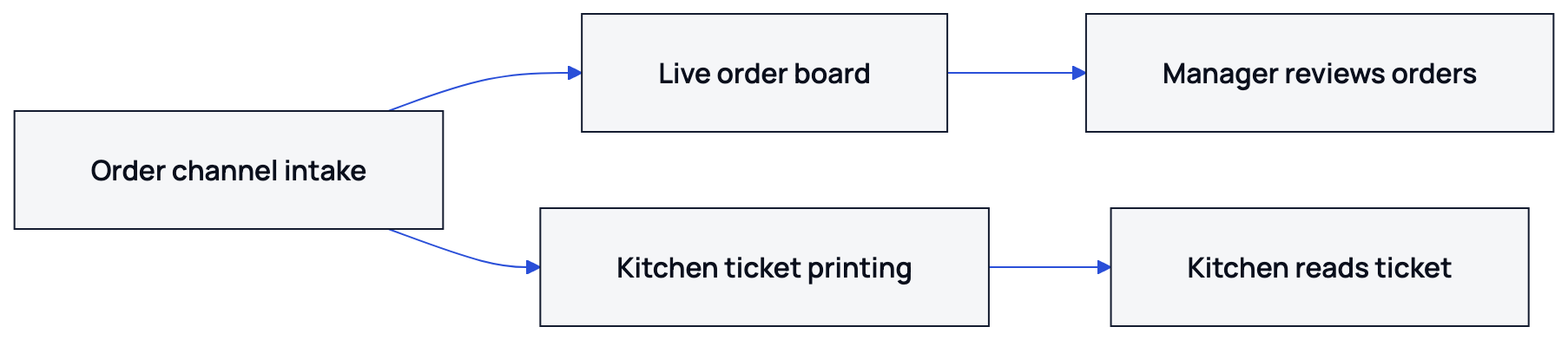
Give every employee the same short explanation: “Every order arrives on the board. The kitchen reads the ticket. The cashier checks the order and payment. If something is wrong, stop and ask before sending it forward.” Avoid explaining features that the employee will not use during that shift.
A 30-minute rehearsal
- Minutes 0 to 5: show one complete order from entry to kitchen ticket.
- Minutes 5 to 12: let the cashier repeat the order while the trainer stays silent.
- Minutes 12 to 18: let the kitchen read two tickets and call out modifiers.
- Minutes 18 to 24: practise an unavailable item and a correction.
- Minutes 24 to 30: run one order from start to finish without help.
The trainer should ask the employee to explain the next action before touching the screen. This exposes confusion earlier than watching someone copy a demonstration. Keep a printed card beside the till with the four actions the cashier uses most often.
How do you handle resistance from staff?
Most resistance has a specific cause. A cashier may fear slowing the queue. A kitchen employee may distrust a new printer after a previous system lost tickets. A manager may worry that a new dashboard creates extra checking. Ask for the exact moment that feels risky, then practise that moment with a real menu example.
| What staff say | Useful response |
|---|---|
| I already know the old way. | Keep the old process for reference, then compare one order step by step. |
| The kitchen will miss the ticket. | Print three test tickets, confirm the category routing, and show that a ticket waits in a queue. |
| This takes too many taps. | Time one complete practice order, then remove steps that belong to another role. |
| Customers will wait. | Start with one supported shift and keep the trainer beside the cashier. |
Nexara's printing approach is concrete: tickets queue and print once, and a ticket stays on the board if a printer is unavailable. Staff can re-route a printer's categories from the dashboard, or use a configured backup printer. The board itself needs a connection, so keep a phone hotspot available as a sensible backup.
How should the first live shift run?
Choose a quieter service period, not the busiest Thursday dinner. Keep one experienced person beside the cashier and one manager watching the board. Do not rotate trainers halfway through the shift. Consistency matters more than covering every feature.
- Before opening: test login, branch assignment, menu availability, printer connection, and paper.
- First five orders: trainer watches every cashier action.
- Next ten orders: trainer observes silently and records only repeated errors.
- During the shift: kitchen staff should call out unclear modifiers before preparation.
- At close: compare the order history with the cashier's net sales and reconciliation.
- After close: choose one fix for the next shift, not ten.
The numbers below are an illustrative example, not a client's actual figures. For a branch handling 120 orders in a day, a manager might review the first 15 orders closely, then inspect exceptions and cancelled orders at close.
Use the go-live in one day checklist for the setup sequence, then use the first-week checklist to review recurring mistakes. Nexara's current rates are available by request at nexaratech.io.
What should you measure after training?
Measure behaviour that affects service. Count how often a cashier asks for help, how often a kitchen ticket needs clarification, and how many orders need correction. Review these at the end of each shift for the first week. Nexara's order history, live board, printer status, and reports give the manager places to investigate.
- Can each cashier complete a phone, pickup, and delivery order without prompting?
- Can kitchen staff read modifiers in Arabic and English?
- Can the manager identify an order waiting for preparation?
- Can the team explain what happens when the printer is unavailable?
- Can the cashier complete the close and reconciliation correctly?
Do not use a quiz as the only proof of readiness. Ask employees to perform the work in sequence. A cashier who can describe a correction but cannot complete it during service needs another ten-minute rehearsal.
What to remember
- Train by role, not by feature list.
- Use five realistic practice orders before the first live shift.
- Keep a trainer beside the cashier and a manager watching the board.
- Review repeated mistakes after each shift and fix one at a time.
- Nexara's founder-led setup gives the team a direct place to ask questions.
Questions people ask
How long does it take to train restaurant staff on new software?
A focused role-based session can prepare staff for a first supported shift. Train the cashier and kitchen separately, then rehearse one complete order together.
Should every employee learn every feature?
No. Teach each role the screens and decisions used during its shift. Managers can learn reports, printer status, and permissions separately.
How do I train kitchen staff when there is no kitchen display screen?
Use printed kitchen tickets. Nexara prints Arabic and English tickets on standard ESC/POS thermal printers, with routing by branch, printer group, and menu category.
What happens if a printer stops during service?
The order stays on the board and the ticket waits in a queue. A manager can re-route the printer's categories from the dashboard, or use a configured backup printer.
Can Nexara's founder help train our team?
Nexara is set up with you by the founder during Amman hours. WhatsApp and email support are available in Arabic and English, and the founder answers support questions.
Is Nexara a POS for cashiers?
Nexara is the order and operations layer beside the till. It collects orders, prints kitchen tickets, and supports cashier reconciliation while the till remains in place.