Closing the day: cash reconciliation by cashier and driver
At 21:00, the till may balance while delivery cash still needs a second check. The close works only when the cashier figure and each driver’s return are tied back to the orders that created them.
Nexara is a restaurant order and operations platform built in Amman, Jordan, beside your cash register. At close, the cashier enters the branch’s net sale, while each order keeps its payment method and driver assignment. Nexara shows cashier reconciliation and cash by driver. Your existing till remains the cash drawer.
Figures in this post are illustrative examples, not a client's actual results.
What stays with the till?
Your cashier continues to use the restaurant’s existing till or cash register for the sale. Nexara sits beside it as the order and operations layer. Orders from the phone, branded website and app, table QR, Talabat and Careem arrive on the live order board, then print in the kitchen and on the configured receipt printer through Nexara’s printing engine.
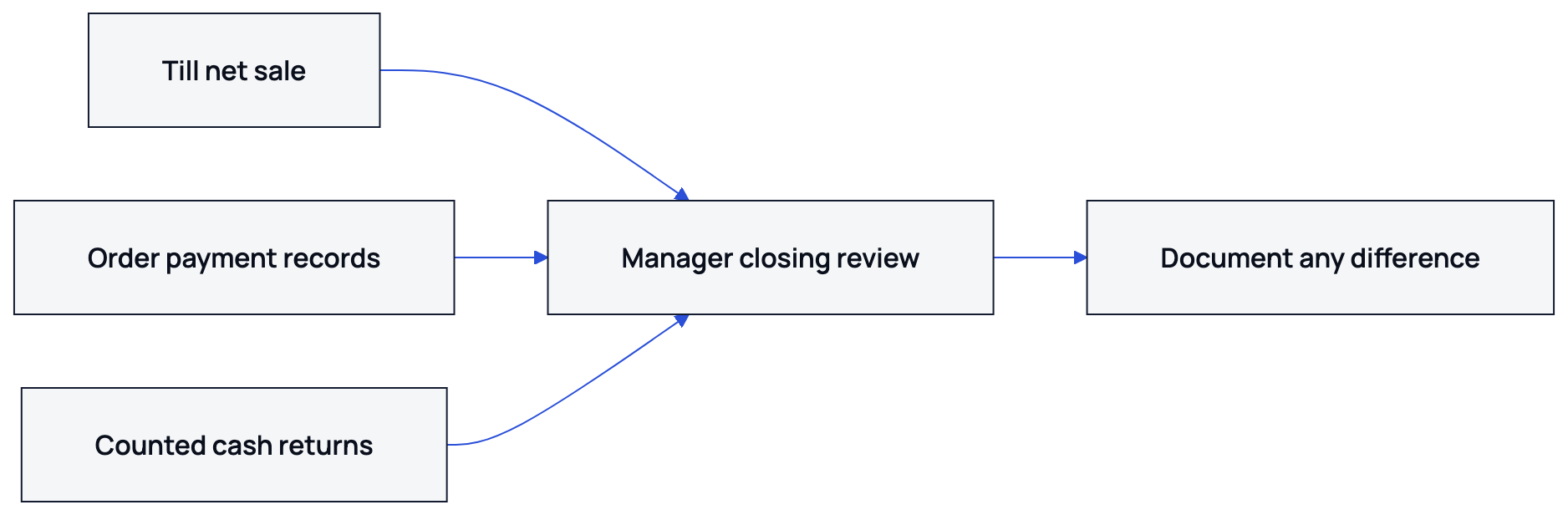
At the end of the shift or trading day, the cashier enters the branch’s net sale into Nexara. The entered figure is reviewed against the orders and payment methods recorded for the same period. The manager can then see where the order records and till figure agree or differ.
How does the cashier close the day?
The process starts with the trading period you want to review. The cashier or manager checks the relevant orders, confirms the payment methods recorded on them, and enters the net sale from the till. Nexara’s reports include an End of Day tab and a Cashier Reconciliation tab.
- Choose the branch and trading period.
- Review the orders included in that period.
- Check the payment method recorded on each order.
- Enter the cashier’s net sale from the till.
- Compare the recorded amount with the entered figure.
- Check the order records for any difference before closing the period.
Order-side payment methods include cash, card, online and pay at counter. Cash orders are checked against cash returned to the branch. Card and online orders are checked against the restaurant’s own payment records.
The report puts the order record and the cashier’s entered net sale in the same review. It does not count the drawer automatically or settle the bank.
What does payment method per order change?
A daily total without payment detail can hide an error. If one order was marked cash when the customer paid by card, the branch can appear short or over until somebody checks the order. Recording the payment method on each order gives the manager a clear starting point.
| Order detail | What the manager checks | Why it matters at close |
|---|---|---|
| Cash | Cash received and returned | Matches the physical cash review |
| Card | Card terminal or processor record | Separates card sales from drawer cash |
| Online | Online payment record | Keeps prepaid orders out of cash totals |
| Pay at counter | Counter payment status | Confirms how a dine-in order was paid |
| Driver assignment | Driver and delivery orders | Supports the driver cash check |
For phone orders, the call-center screen supports cash, card and a CliQ choice stored as online. CliQ is also used for subscription billing and selected phone-order payment flows. It is not a storefront checkout method in Nexara.
For payment details, read the guide to payments by CliQ, card and cash.
How do you reconcile cash by driver?
Driver reconciliation begins with delivery orders assigned to your own fleet. Nexara has a Driver role, delivery orders and dispatch records for restaurants using their own drivers. At close, the manager can group expected cash by driver and compare it with what each driver returned.
Use the orders assigned to that driver, their payment method and their status. Card or prepaid orders should not be treated as cash collected at handover.
- Filter delivery orders for the closing period.
- Separate your own-driver orders from courier-partner orders.
- Group cash-on-delivery orders by assigned driver.
- Compare the expected cash with the amount returned.
- Check cancelled, refunded and incomplete orders before recording a difference.
- Record the follow-up with the branch manager.
The Cashier Reconciliation report places the cashier’s figure beside the order records. Nexara also supports dispatch through Careem Express, TopDeliver and Nashmi. Courier-partner deliveries should be reviewed according to the partner’s settlement process.
For the delivery workflow itself, see delivery dispatch with your own drivers.
What might a close look like?
Imagine a Jordanian branch with 120 orders in one illustrative trading day. The cashier enters a net sale of 900 JOD from the till. The order records show 500 JOD in cash, 240 JOD by card, 100 JOD online, and 60 JOD paid at the counter. The manager checks why the payment categories do not match the till figure before closing.
Three own drivers handled the branch’s delivery orders. The cash orders assigned to Driver A total 110 JOD, Driver B totals 86 JOD, and Driver C totals 64 JOD. Each driver returns the amount expected from the assigned orders. A 10 JOD difference prompts an order-by-order check.
| Role | Expected amount | Close check |
|---|---|---|
| Cashier net sale | 900 JOD | Compare with order and till records |
| Driver A | 110 JOD | Cash orders assigned to Driver A |
| Driver B | 86 JOD | Cash orders assigned to Driver B |
| Driver C | 64 JOD | Cash orders assigned to Driver C |
Keep the cashier entry, order payment method and driver assignment in the same trading period.
Where does Nexara fit in the manager’s close?
Nexara gives the manager report tabs across orders, products, customers, channels, delivery, money and operations. The Cashier Reconciliation report is one part of that view. Search and filters in order history help the manager inspect a specific order when totals do not agree.
- The till supplies the cashier’s net sale.
- Each order supplies its recorded payment method.
- Dispatch supplies the driver assignment and delivery status.
- The Cashier Reconciliation report brings the figures together for review.
- The manager follows up on differences using the order record.
Nexara has a free plan, followed by paid plans per branch in Jordanian dinar. Current rates are available on request.
For other management views, read restaurant reports that matter or review the Nexara features.
What to remember
- The till stays in place. Nexara records the operational detail beside it.
- The cashier enters net sale at close rather than replacing the cash register.
- Payment method per order separates cash, card, online and pay-at-counter checks.
- Own-driver cash can be reviewed by driver and matched to assigned delivery orders.
- Differences are checked against orders before the branch closes the period.
Questions people ask
Is Nexara a POS or cash register?
No. Nexara is the order and operations layer beside the till. Your cashier keeps using the existing cash register and enters the net sale at close.
What does the cashier enter at end of day when Nexara is not the till?
The cashier selects the trading period and enters the till’s net sale. The manager then checks the Cashier Reconciliation and End of Day reports against the order records.
Can Nexara show cash by driver?
Nexara supports a Driver role, own-fleet delivery orders and dispatch records. The manager can review cash delivery orders by assigned driver and compare expected cash with what each driver returns.
Does Nexara count the cash drawer automatically?
No. The cashier enters the net sale from the till. Nexara compares that entry with recorded orders and payment methods.
Can I reconcile card and cash separately?
Yes. Payment methods are recorded per order, including cash, card, online and pay at counter. This lets the manager separate drawer cash from card and prepaid orders during review.
Does Nexara provide accounting or ERP integration?
No accounting or ERP connector is verified for Nexara. The platform provides order, payment-method, cashier reconciliation and operational reports.